I just spent what seems like an inordinate amount of time getting an NSTableView to work exactly the way I wanted it to. This page was a good reference, even though it’s a few years old. And thank god for Stack Overflow. I have the feeling that I’ve cobbled something together that a serious Mac developer would laugh at, but it does work, so I’m happy.
Category: programming
Mercurial and Git with Xcode 4
I’ve been reading up a bit more on Xcode 4. The prior version, Xcode 3, had SCM integration with Subversion, Perforce, and CVS. The new version has support for Subversion and Git. (I’m not sure if they dropped CVS and Perforce, but I’ve only seen Subversion and Git mentioned.) And, of course, I decided a couple of weeks ago to use Mercurial instead of Git. Oh well. It’s not a big deal to do version control outside of the IDE, but it’s always nice to have it integrated.
I think I’ll be sticking with Mercurial anyway, since Bitbucket allows unlimited private repositories under their free plan, while Github doesn’t.
XCode 4
I was surprised to read that Apple released Xcode 4 today. Usually, I’d know about something like this in advance, but I seem to have missed this entirely.
I’ve been doing a lot of work in Xcode over the last few weeks, trying to learn Cocoa programming, and working on a small contract job, rewriting an old OS 9 FutureBasic app.
I’m a little disappointed to see that they’re charging $5 for it now. That’s not much, compared to, say Visual Studio 2010 Professional
I think I’m going to stick with Xcode 3 for now, since I need to get this project done, and all my reference material right now is oriented towards Xcode 3. Once I’m done with the current project though, I’ll probably download and install Xcode 4. I’m not sure how I feel about the switch to a single-window interface, but I like the fact that Interface Builder will no longer be a separate program, and it looks like they’ve made a number of other cool little improvements.
progress on Cocoa programming
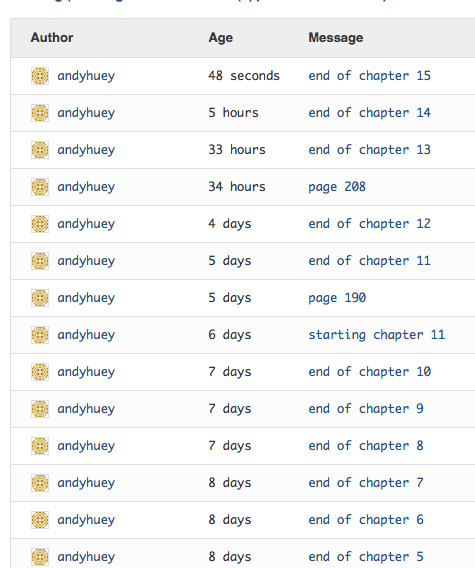
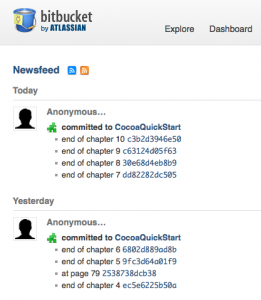
I’m making some progress, working my way through the Cocoa Programming book that I’m reading right now. I’m including a screenshot from Bitbucket below, showing my check-ins over the last week. I have also started working on the actual Cocoa project that I’m supposed to be working on. I haven’t gotten very far with it, though. Messing with Cocoa has made me realize how proficient I’ve gotten with .Net programming over the last few years. In Cocoa, I’m struggling with stuff that I could do in .Net in my sleep.
Also, I’m realizing that .Net is a much more programmer-friendly environment that Cocoa and Objective-C. I’m not looking to start any language/framework wars, but there are a lot of things that are much easier to do in C# than in Objective-C. And wiring up a GUI for a Windows Forms app is a lot easier than creating a desktop Cocoa app.
fun with Mercurial
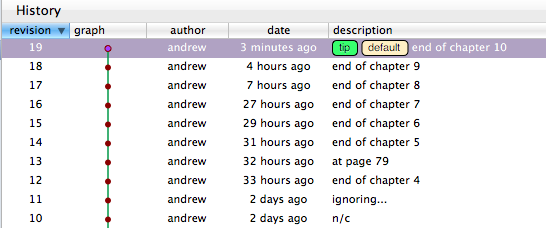
As I’ve been working my way through Cocoa Programming, I’ve been checking in my source code, using MacHg and Bitbucket, at the end of every chapter. One nice side-effect of this is that I can easily see my progress in the book. Here’s a screenshot from MacHg:
and here’s one from Bitbucket:
Mercurial
I’ve been doing a bit of work in my spare time to try to learn Objective-C and Cocoa programming for the Mac. I got sidetracked from that a bit today to explore Mercurial. I’ve been meaning to try out some of the newer version control systems, like Git and Mercurial, but just hadn’t gotten around to it. The Mac programming stuff seemed like a good excuse to set up a test environment, and get my “Hello world” exercises under version control.
I set up an account at Bitbucket today, installed MacHg on my MacBook, and started messing around. I had a few false starts, and did a few things wrong, but I think I now have things configured so that I can track my work in a local repository, and push it up to Bitbucket whenever I want.
I was attracted to Bitbucket largely because it’s run by Atlassian. I used JIRA at my last job, and like it a lot. My Bitbucket account was pretty easy to set up. It’s got a nice interface for browsing your source files, and looking at changesets. And it’s got an issue tracker and wiki built in.
And I decided on MacHg on the client side, largely because of some recommendations I saw on Stackoverflow, and a couple of other places. It took me a little while to get used to the interface, but now that I understand it, it’s pretty easy to use.
xcode project template grief
I’m trying to learn a bit of Mac programming right now. I’m using Cocoa Programming: A Quick-Start Guide for Developers, which is turning out to be a pretty good book so far. I just stumbled across an issue with my XCode install though. It’s pretty well explained here and here. Having fixed that problem, I am apparently ready to write a Hello World program. Joy!
I should probably just clear out my “/Developer/Library/Xcode/Project Templates” folder, and maybe a few other folders, and do a clean XCode install. But I know that will take some time, so I’m going to put that off. for now.
mashups
It looks like I will be working on a mobile app (iPhone and Android) at work soon, and I’ve been vaguely interested in mobile development for a while now anyway, so I spent some time this weekend looking around for ideas for a small project to work on, to get my feet wet. I spent some time on Programmable Web, and was interested to see this article wondering why there aren’t any great mashup apps for Arlington National Cemetery. Having recently attended a funeral there, I can see how a good mapping app for the cemetery would be really useful. It’s a huge place. There’s an interesting comment following the article from someone who tried to work with the cemetery to try and get something done, but he didn’t get too far.
SSMS Tools Pack
Stumbled across the SSMS Tools Pack today. How has this been around since 2007, without me knowing about it? I installed it at work, and I’m already finding it useful.
found it
Following up on my post from a couple of days back, I found my invalid nulls today. There were null values where there shouldn’t have been on 20 records in a table of 100,000+. I fixed them. Tomorrow, I hope to zero in on whatever program bug is causing them to get in there in the first place.
A couple of quick observations:
First, SQL Profiler is my friend. There wasn’t really any way I could trace what the VB6 program was doing, and it wasn’t putting out enough error info for me to figure it out, but by following a SQL trace, I eventually isolated the problem records.
Second, I discovered Query ExPlus today, which turns out to be a pretty good tool if you need quick access to a SQL query tool on a machine where you can’t actually install the full SQL Management Studio.