Obsidian, day three

Well, I’m now on day three of my vacation week, and day three of my Obsidian setup. (See here for day one and day two.) I’m going to write up some notes below on various things I’ve been working on.

Obsidian Sync

I signed up for Obsidian Sync, at the $8/month Plus level. For now, I’m paying month-to-month, so it’s actually a $10/month plan. I wasn’t sure if I needed Plus or Standard. My vault is around 700 MB, so it’s under the 1 GB limit. But I initially had some attachments that were over 5 MB, so that might have been an issue. I think I’ve removed or resized all of those now, so I could probably make do with the Standard level. The Plus plan also gets you a full year of revision history, which is nice, so I might stick with that either way. I’m not sure yet.

I’d previously experimented with simply putting my vault in OneDrive and iCloud. OneDrive worked fine for PC/Mac sync, but wouldn’t have worked on iOS. I thought iCloud might work OK on iOS, but it’s a little iffy. So, for now, I’m paying for Obsidian Sync.

Obsidian Sync does seem to work fine on iOS and iPadOS, but there’s one thing I’ve noticed that I didn’t initially think about: Obsidian, even on iOS, is local-first, so your whole vault gets synced to your iPad and iPhone. That’s not a huge problem, but it’s interesting to see that the Obsidian app on my phone is using 800 MB of storage, while Evernote is only using 500 MB. I think Evernote caches a certain amount of information locally, but the design is online-first, so (I think) it’s always going to try to get info from the cloud.

Tasks

My big project today has been converting all of my Evernote reminders to tasks. I’m still a little nervous about this. I’m losing the email reminders and iOS notifications that Evernote provides. So I’m going to have to be good about looking at my main task note in Obsidian. This is how I track important life stuff, like paying bills, so if it falls apart, I’m in trouble.

I’ve now done the migration, and I have 70 tasks in my vault. I did the migration manually, rather than trying to create a script to do it. I wanted to be able to review all of the notes associated with the reminders, and think about them, and maybe revise them a bit.

One thing I did to make this all easier: I assigned a shortcut key to the “create or edit task” command. I used Alt-T for that (Opt-T on the Mac). The pop-up dialog for this is reasonably easy to use. I do have one big problem with it though: there’s no date picker. When I’m setting due dates on tasks, if they don’t need to be done on a specific day, I like to set them to the closest Saturday, which is my usual day for taking care of random to-do items. I guess I’ll have to live without that for now.

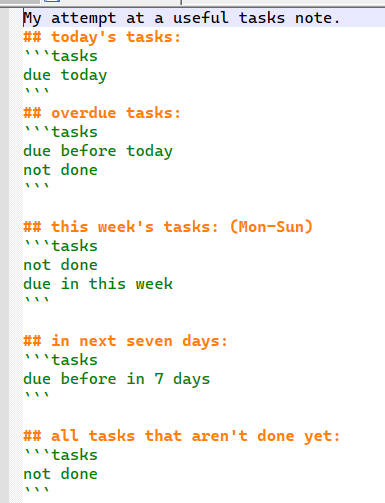
To actually view the tasks, I have a “task note” with a number of task queries on it. For now, it looks like this:

task note

(I tried to insert the code here, but WordPress got confused, so I’m just putting a screenshot here.)

So not too fancy. I’d really like to find a way to format this a bit better. Maybe in a table? If there’s a way to show task info in a “base”, I haven’t figured it out yet. I did use a base to show all of my Evernote reminders, and that worked well. I might as well stick that in here too:

views:
  - type: table
    name: Table
    filters:
      and:
        - '!note["EN-Reminder"].isEmpty()'
        - note["EN-Reminder-Done"].isEmpty()
    order:
      - file.name
      - EN-Reminder
      - EN-Reminder-Done
    sort:
      - property: EN-Reminder
        direction: ASC

This is basically showing all notes that had an Evernote reminder, but did not have a “reminder done” date.

In working through my reminders/tasks, I’ve noticed that a lot of them are just reminders to review a given annual subscription before it renews. I think I might look at seeing if there’s a way to categorize these specific tasks and separate them out. Maybe a “#subs” tag or a property. And once I started thinking about properties, I started thinking that I could have a specific type of note with a number of specific properties that I could use to organized my subscriptions. Maybe properties for renewal date, cost, URL, and so on. Well, that’s a project for later maybe.

Images

I may have gone a little overboard with image cleanup today. I installed this plugin, which is a simple little script that renames all images on the current note to match the note title. So, for instance, ‘IMG_1234.jpg’ becomes ‘drivers license 2014.jpg’. It only does this for one note at a time. So I went through my main archive folder and ran it on, probably, around 400 notes. And did some general note cleanup along the way.

I think I need to stop myself from going overboard with miscellaneous note cleanup. It’s easy for me to go down a rabbit hole of doing low-value file maintenance tasks and losing sight of the big picture. This has been a problem for me, in general, really. Obsidian really gives me an opportunity to waste a lot of time fiddling with unimportant stuff, and I need to watch out for that.

(Update: I had some sync issues after all of those image file renames, so I think I’m going to delete the plugin linked above. I don’t know if the sync problems were due to the plugin, or something else, but… better safe than sorry. And I’m hoping that the kind of sync issues I just had aren’t common with Obsidian sync. If they are, then I’m going to need to go back to Evernote!)

Evernote to Obsidian, work in progress

As per my previous post, I went ahead and migrated myself from Evernote to Obsidian yesterday. I’m now almost at the point of no return. (Or at least at the point where I’d have wasted a lot of effort if I were to throw it away now and go back to Evernote.)

I used Yarle for the migration. I’d done several experimental, partial, migrations first. For the final migration, I did all of my Evernote notebooks all at once. (I had a thought in my head that Yarle might resolve cross-notebook links if I did that.) The migration went pretty smoothly, but Yarle seemed to lock up at one point. I checked the count on the output files, and it seemed like it had created all of them, so I did an “end task” on it and proceeded from there.

In the end, I’ve wound up with a lot of broken links. I’m starting to wonder if killing the Yarle process was a mistake. Maybe it had created all of the .md files, but was still reconciling the links? I don’t really know enough about how Yarle works.

Either way, I’m now cleaning up hundreds of broken links. With the broken links plugin, I’m able to at least identify them easily. There are actually two different kinds of broken links in my vault now: there are many ‘regular’ broken Markdown links; I can ID those with the plugin. Then, there are links that point out to share.evernote.com, which didn’t fully get converted to Markdown links. Those are technically ‘valid’ links, but of course they open up my original Evernote notes in a web browser, so I’ll need to clean those up too.

I started doing the link cleanup manually, but at some point, I saw how big the job was getting, and decided to write a couple of helper scripts. With the help of Kagi Assistant, I wrote two PowerShell scripts. The first cleaned up links where Yarle had left them in a format like this:
[[guid/guid|name of link]]
In that case, I wanted to change them to:
[[name of link]]

Here’s the script I used:

 Get-ChildItem -Recurse -Filter *.md | ForEach-Object {
    $content = $_ | Get-Content -Raw
    $new = [regex]::Replace($content,
        '[[[0-9a-f]{8}-[0-9a-f]{4}-[0-9a-f]{4}-[0-9a-f]{4}-[0-9a-f]{12}/[0-9a-f]{8}-[0-9a-f]{4}-[0-9a-f]{4}-[0-9a-f]{4}-[0-9a-f]{12}|([^]]+)]]',
        {param($m) "[[{0}]]" -f $m.Groups[1].Value},
        'IgnoreCase'
    )
    if ($new -ne $content) {
        $_.FullName                    # show changed file
        Set-Content -NoNewline -Path $_.FullName -Value $new
    }
 }

And for the second case, I wanted to clean up the external Evernote links, like this:
[name of link](https://share.evernote.com/note/guid)
To again change them to this:
[[name of link]]

So here’s that script:

Get-ChildItem -Recurse -Filter *.md | ForEach-Object {
    $content = $_ | Get-Content -Raw
    $new = [regex]::Replace($content,
        '[([^]]+)](https?://share.evernote.com/[^)]+)',
        {param($m) "[[{0}]]" -f $m.Groups[1].Value},
        'IgnoreCase'
    )
    if ($new -ne $content) {
        $_.FullName                    # print the altered file
        Set-Content -NoNewline -Path $_.FullName -Value $new
    }
}

I didn’t even really test these scripts, I just backed up my vault, then ran them. And, surprisingly, they seemed to work right on the first attempt.

So that got me through most of the link cleanup. I then did a bunch of manual fixes, and just kept going until the “broken links” list was empty.

(I may have mixed up my tenses in this post. I started writing it as I was working on the migration, and finished it after I got all the link cleanup done. Sorry.)

My next task will likely be attachment cleanup. I guess that’ll go in yet another blog post!

from Evernote to Obsidian, take two

I got an email from Evernote last week letting me know that my subscription price would be increasing to $250/year, effective January 7, when my annual subscription renews. It had gone up to $130/year in 2023. Prior to that, it was $70/year.

I’m not really unhappy with Evernote as a product, or with Bending Spoons as a company, but the price on it is getting a bit ridiculous. Here are some links to articles/videos of other folks talking about the price increase:

I had previously experimented with moving to Obsidian, in 2023, but didn’t go through with it. But now, it’s looking like I really need to do something. Maybe I could afford $250/year for Evernote if I thought they were going to stick with that price for the foreseeable future, and continue making the app better. But I’m just not convinced that they’re on a good trajectory, in terms of my own personal use-case for the product.

Cory Doctorow coined the term en****tification a while back, and it’s a useful term, though I wish he had come up with something that didn’t incorporate one of George Carlin’s seven dirty words you can’t say on TV. Still, it’s a good term. Here’s a Metafilter discussion on the (let’s call it) enpoopification of note-taking software, from 2023. I’m not sure if Evernote really falls into this category, but you could make a good case for it.

So, anyway, I’m back to experimenting with Obsidian. Luckily, I’m taking this coming week off from work, to use up my vacation days for the year, so I’ve got the time for it.

I’ll probably post more about this when I get farther along, but I thought it would be useful to write up some initial notes, informed by my previous efforts, and by watching a whole bunch of YouTube videos.

I’ll start with the process of importing from Evernote. For that, I’m using Yarle. Obsidian now has an official importer for Evernote, but I think Yarle is probably still better. Looking at the commit history on Yarle in Github, I see that the author has continued to work on it. Having tried it out again, I’m not sure if it’s working better than it was in 2023, but it’s definitely working well enough, I think.

I’ve been tweaking my template for Yarle. Here’s what I’ve got at this moment:

---
{title-block}EN-Title: "{title}"{end-title-block}
{created-at-block}EN-Created: {created-at}{end-created-at-block}
{updated-at-block}EN-LastUpdated: {updated-at}{end-updated-at-block}
{source-url-block}EN-SourceURL: {source-url}{end-source-url-block}
{reminder-time-block}EN-Reminder: {reminder-time}{end-reminder-time-block}
{reminder-done-time-block}EN-Reminder-Done: {reminder-done-time}{end-reminder-done-time-block}
{tags-yaml-list-block}Tags: {tags-yaml-list}{end-tags-yaml-list-block}
---
{content-block}{content}{end-content-block}

So I’m putting a bunch of stuff in the “frontmatter” of the note. This stuff is mostly just there for reference; I won’t actually need it going forward. I plan on converting Evernote’s reminders into Obsidian tasks, either manually or via a script or something. And the tags block seems like the cleanest way to get the tags over from EN.

The only setting in Yarle that I’ve changed from the default is to set “store attachments in notebook level” to yes. I’m still not sure about the way I’m dealing with attachments, but I think this is good enough.

As for my Obsidian setup, I think I’ve settled on a batch of plugins that’ll give me most of the functionality I need (with some compromises and caveats). Here’s the list:

  • Notebook Navigator – This is a great one that allows you to get your Obsidian screen to look a lot more like what I’m used to with Evernote. Getting this installed got me past a lot of my hesitation with Obsidian.
  • Omnisearch and Text Extractor – These two should bring some decent search functionality to Obsidian.
  • Tasks – I’m going to try to replace the Evernote reminders functionality using Tasks. I know I won’t be able to do a lot of the stuff that Evernote can do (email reminders for instance), but I think I can get a workable system cobbled together.
  • Broken Links – I’m using this to identify broken links in my imported notes. I’m seeing a lot of problems there, actually. I won’t get into the details here, but I’m going to have a lot of fix-up to do, I think.

Whew. So maybe that’s enough for this blog post. I intend to spend a bunch more time working on this tomorrow.

One thing I want to do this time is to make a relatively quick decision to either switch over or not, and to go all-in on Obsidian if I do. I don’t want to dither on it, and wind up having to renew my Evernote subscription, then spending a lot of time flipping back and forth between the two systems. (I’m kind of doing that with Raindrop.io and Pinboard right now, and it’s not optimal.) Sink or swim!

old anime

I finally finished watching the Devil Lady anime series yesterday. I mentioned it in a blog post from July 2024; that’s when I started watching it. I started out watching it on DVD (from a box set I bought in 2005), then switched to watching it on Amazon, when I hit a snag with one of the DVDs. Then, it disappeared from Amazon, and I thought I’d watch the final DVD in the set, but there was a problem with that DVD too, so I found that it was streaming on Pluto, and finished watching it there. Overall, I don’t know if it was worth all the effort. But hey, that’s one more anime DVD set I can cross off my bucket list!

The next item on my list is Excel Saga. I started watching that one not long after I started Devil Lady, but only got through disc one. (Both of those shows are the kind of thing I need to be in a fairly specific mood to watch, so I’m not exactly binging either one. I’ll get in the right mood, watch a few episodes, then give up on it for a few months.)

I’ve been having trouble with DVDs a lot lately, and I’m finding that discs that don’t work on my Xbox work fine on my computer’s DVD drive. So I’ve done some DVD ripping recently (well, Dec 2024, so kinda recently), and I seem to have a workflow figured out for that. I’m using HandBrake to rip, and VLC to watch stuff on my Apple TV.

I’m ripping the Excel Saga DVDs right now. (Seemed like a reasonable thing to do on a Sunday.) Of course, I’ve also realized that all of this stuff is on Crunchyroll, which is only $8/month, so I’m not sure why I don’t just give up on the DVDs and stream this stuff.

I was just listening to an episode of Judge John Hodgman where a married couple were arguing about what to do with the husband’s DVD collection after he dies. I think maybe I should be leaning towards getting rid of my collection, but… I don’t want to.

Ubuntu and old hardware

I decided to install Ubuntu on my old Windows 10 PC yesterday. My new HP Mini PC has been working fine for a while, and I don’t think I need to keep the old one around “just in case” anymore.

I have a long history of messing around with various Linux distros, but never really sticking with Linux as my main OS, or ever really doing any meaningful work on it. (My Linux tag on this blog has entries back to 2002, and I’ve been using Linux since the 90s, when I first installed Manchester Linux from two floppy disks.)

I’m honestly not sure if I’m going to keep the old machine. It used to be that I could find someone to give my old PCs away to pretty easily, but that’s really not the case anymore. Part of that is maybe not having as many friends and family as I used to, and part of that is PCs being (relatively) cheap and ubiquitous these days. This PC is still “good”, from my perspective, and there’s plenty that could be done with it. But it’s a big tower PC and getting rid of it would allow me to simplify things on my desk a bit, and clean up some of my tangled cables.

Maybe when I’m retired, I’ll become a “tech fairy” like this guy. For now, I guess I’ll just keep the old PC where it is, and boot it up once in a while to play with Linux.

I might as well talk a little bit about the current setup process for Ubuntu and how it compares to my previous experience with Linux distros. First, I should say that it wasn’t hard at all, and I really didn’t hit a single snag. In the past, there’d usually be some issue or another with video drivers or something, but it was all very smooth. I guess that’s the result of years of work smoothing things out with these installers, and maybe also because there’s been some natural convergence over the years, where there are fewer outliers and weird edge cases.

The specific version I installed was Ubuntu 24.04.3 LTS. I’m definitely not at a point where I need the “latest and greatest.” I’m better off with the stable version.

The process was pretty smooth. I first downloaded a 6 GB ISO file, which took some time. Then I used Etcher, their recommended tool, to create a bootable USB stick. Then I booted from the stick and followed the prompts. The actual install process took less than 30 minutes.

Today’s Ubuntu desktop doesn’t look terribly different from how I remember it looking the last time I used Ubuntu on a desktop, which was probably 2015. (How time flies!) In terms of the tools that you get out of the box, with the relatively minimal install that I did, it’s mostly just Firefox and a few other random things. Firefox was enough for me to bootstrap the basic stuff that I really need.

I found that the 1Password Firefox extension works in Linux, so that was good. There seems to even be a 1Password desktop app for Linux, but I didn’t get around to trying that.

There’s no Evernote client for Linux. (Or at least not an official one.) There are a couple of unofficial clients, but I didn’t try those. The web client for Evernote works reasonably well in Firefox, so that’s good enough.

The next thing I tried was Visual Studio Code. That was downloadable from the Ubuntu “App Center.” The install was simple and easy. I didn’t really get very far with VS Code though; I just checked it out to make sure it worked.

If I was serious about doing anything meaningful with Ubuntu, I’d have to do a lot more work figuring things out, but it’s nice to know that I’ve made a start with it, and I could go further if I wanted to.

figuring out how to consume news

Here I am, writing another blog post about media consumption. Well, why not? It’s weird out there, and I’m just trying to keep my head on straight.

I’m still thinking about signing up for Apple News+, which I’d likely do by upgrading from Apple One Individual to Premier. So that’s be an increase from $20/month to $38. I also pay $1/month for extra iCloud storage, so I’d be able to cancel that, so the total increase in cost would be $17.

Apple News+ alone would be $13/month, so if I’m going to do it, I might as well go with Apple One Premier and get the 2 TB of iCloud and Apple Fitness+ too.

I made a list of pros & cons for Apple News+. On the “pro” side, it gets me access to a bunch of news sites all under one subscription. There’s lots of variety, and it includes local news from a few NJ sites.

On the “con” side:

  • It doesn’t work on Windows. (Or directly through a web browser.)
  • It doesn’t seem to work with Instapaper. (I’ve read some mixed reports about how it works with read-it-later services, but it generally doesn’t seem to work.)
  • There’s no way to send an article to my Kindle or Kobo to read on an eInk device.
  • The service has ads, and they’re not easily blocked.

I’ve also been considering a “why not both?” option, where I use Apple News+ for some stuff, but continue subscribing to individual publications, where it makes sense to do so.

On a related topic, I’ve been playing around with my RSS tools recently. Right now, I use The Old Reader as my “back-end” service. For a front-end, on Windows, I generally just use The Old Reader web site. On iPhone and iPad, I use Reeder Classic. On my Mac, I sometimes use Reeder and sometimes the web site.

I’ve been trying out NetNewsWire as a replacement for Reeder. I think I may switch over to it. The design works better for me. It’s a pretty vanilla design, but that’s what I want. It’s black text on a white background, easy to read. Reeder is black on a kind of off-white background, which is harder for me.

On the back-end, I’m kind of interested in looking at stuff that does a bit more with the feeds. I might want to try a product that lets me send email newsletters into it, so I can get those out of my email. I’m not really sure if I need or want that though. I also like the idea of being about to do something interesting with the data, like putting together a custom “front page” for me. I haven’t gotten very far with any of that.

Of course, if I start using Apple News+, I might spend less time with my RSS feeds.

One more topic: Unfortunately, it looks like NJ PBS is shutting down next year. (Here’s an article about it from CBS News.) Hopefully, NJ Spotlight News will continue. (They say they will, but who knows?) The way things are going right now, it feels like a lot of good things are going to disappear in the near future. (And, of course, some already have.)

Well, that’s a downer to go out on. I wanted to find a quick positive thing to put at the end here, but I couldn’t come up with anything. Sigh.

messing around with Firefox and Vivaldi

My usual browser setup, for a while now, has been to use Firefox on desktop and Safari on mobile. (I have my bookmarks syncing between Firefox and Safari with iCloud for Windows.) That’s worked out pretty well, and I really have no complaints. But, of course, I’m a nerd, so I have to mess around with things once in a while, even if they work well.

So my first experiment was to see if I could switch to Firefox on mobile, so I’d be using Firefox everywhere. That’s been working well, though there are some tradeoffs. Apple, of course, puts every browser on iOS except Safari at a disadvantage, in several ways. The most obvious one is content blockers, which only work with Safari. I use 1Blocker on iOS, and that works reasonably well, but not nearly as well as uBlock Origin on desktop. With Firefox on iOS, I guess that their Enhanced Tracking Protection helps a bit, but it would be nice to have real ad blocking.

My next experiment has been to see if I could switch from Firefox to Vivaldi. I haven’t gotten too far with that, and I don’t know if I’m going to stick with it. I have Vivaldi set up on all of my main devices now: Windows desktop, MacBook Air, iPhone, and iPad. Vivaldi does do ad-blocking on iOS, since it’s got built-in ad-blocking. I’m not sure if it’s all that great though. I need to use it some more and get a feel for it.

One issue I’ve been having with Vivaldi is their settings sync. In theory, all of the settings should sync between all the installs of the browser, but that hasn’t worked out perfectly. The ad-blocking exception list doesn’t seem to sync at all. Another one is that my search setup doesn’t sync correctly. There seems to be a workaround, but it’s not perfect.

Speaking of search, I’ve been sticking with Kagi. I first started using it earlier this year, and I’m liking it. Of course, setting it up in a new browser can be a hassle, since you need to be logged in to use it, and since it’s not on the list of default search engines in any major browser.

So, overall: I’m going to continue messing around with Vivaldi a bit, but I might give up on it. If I do, I don’t know if I’ll go back to using Firefox everywhere, or my old system of using Firefox on desktop and Safari on mobile.


mixed feelings about Microsoft

I’ve been having a lot of mixed feelings about Microsoft lately, and I feel like I need to blog about this, so I can get some stuff straight in my head.

Overall, my feelings about Microsoft have gone back and forth, over the years. At one point, I thought of Bill Gates as being pretty darn evil. After his retirement, and his reinvention as a philanthropist, I softened up on him a bit. I never liked Steve Ballmer. And I liked Satya Nadella quite a lot, in the beginning, and even read his book, but I’m starting to have mixed feelings about him. So that’s the CEOs.

As for operating systems, I tolerated MS-DOS and Windows 3.1, and knew I had to learn and use them, but never much liked them. When Windows 95 came out, I was actually kind of excited about it, enrolled in the preview program, and installed it on my home machine, from floppy disks. My enthusiasm for later Windows versions has varied. I do mostly like Windows 10, which is what I’m running on my home desktop PC right now.

And as a programmer, I’ve also gone back and forth. I liked classic ASP when that was released. And I liked ASP.NET, and .NET in general, when that came out. I’ve been an enthusiastic .NET developer since 2002.

Microsoft Build was this week, and I (as usual) registered for the online component of the conference, and tried to watch some of the content. Honestly, I couldn’t find much of interest to me. They’re really pushing AI, and, while I’m not entirely against it, I’m also just not as enthusiastic about it as they’d probably want me to be.

Watching this week’s Windows Weekly reminded me of some of the issues I have with Microsoft right now. First, MS is having issues with employees protesting during events, mostly around Israel/Palestine, and I don’t think they’re handing that well. (And here’s something from Brian Eno about the issue.) Second, I don’t think the layoffs they did recently were necessary, or handled well. Third, they had Elon Musk on stage during the Build keynote. (I don’t think I need to say why that’s bad…) Overall, they’re doing what I guess I should expect a giant tech company to do, but, well, I was hoping for better.

So, where does that leave me? Well, I still need to use Microsoft products for work, and a big part of my job is supporting our relationship with Microsoft, so I still need to be invested in the ecosystem. I registered for the AZ-204 exam today, for the end of June. (I blogged about that recently here.) I still have a lot of studying to do, to prepare for that. So, in general, I’m still going to keep learning and trying to keep up with this stuff. I can’t give it up and switch to Linux.

On the home front, I’ve been thinking about what I should do about my ten-year old Windows 10 desktop PC. It’s still my main machine, and it still works fine. With Windows 10 reaching end of support in October, I need to do something, but I can’t decide what to do. I might decide to subscribe to a third-party update service for Windows 10. That’s probably a little risky, but might be my best choice.

I’ve also been playing around with the idea of switching the machine over to Linux. That’s probably a horrible idea, but I kind of want to do it. There’s a campaign going on to encourage switching from Win 10 to Linux, and that’s what put the idea into my head. I would really still need to run Windows, though, so I’d have to figure out if I could make do with using my Lenovo ThinkPad for all my Windows stuff, or if I could dual-boot the desktop machine, or run Windows in a VM, or something. Regardless, I would just be complicating things and making life harder for myself. (Which doesn’t usually stop me from doing something stupid, but…)

My other thought was getting a Mac Mini and trying to gradually move my home stuff off Windows and onto Mac. That’s a lot more doable. (I already have a MacBook and use it for a lot of stuff.)

Well, this post has been a mess, and I don’t think I’ve decided on anything. But maybe I’ve moved forward a bit with my thinking. I going to leave it there, and try not to worry about it too much right now.

using up my PTO

I’m taking three days of PTO this week, to use up the last few days that I can’t roll over to next year. I’m counting it as a bit of an accomplishment that I actually have a few days left to burn, and that I never got sick enough this year to use them up on sick time. (Unlike last year, when I got COVID.)

Of course, I’m sick right now, so I’m taking it easy, and not doing much. I spent some time yesterday messing around with my DRM-free comic book files again. (See previous post.) This time, I decided to see if I could replace some very large CBZ files from an old Star Trek Humble bundle with smaller EPUB files.

This sent me down a rabbit hole, messing around with iPadOS comic book and EPUB reader apps, Calibre, and some other random stuff. I was briefly mad at myself for wasting so much time on it, but then I realized that (a) I’m taking PTO, (b) I’m  sick enough that I didn’t want to do much else, and (c) I actually enjoy messing around with stuff like this, from time to time. So here are some notes on what I did and where I left things.

First: I’m not sure if there’s a good reason why these specific Star Trek comic book files were so big as CBZs and so much smaller as EPUBs. I think Humble doesn’t necessarily put a lot of work into optimizing their files. CBZ files are compressed, so it’s not a lack of compression. (The “Z” is for “Zip”.) And EPUB files are also compressed, so I guess the only thing that would account for the difference would be image file size. So maybe they made the CBZ with high-resolution images, and the EPUB with lower resolution images.

Anyway, I downloaded some EPUBs and tried them out with my usual comic book reading app on the iPad, Panels. They were pulled into the app with no problem, and are readable, but the covers wouldn’t show. I probably should have stopped there and said “fine”, but I decided to mess around some more.

First, I pulled one of the EPUBs into Calibre, and let that mess with it a bit. I verified that the cover was visible in Calibre, so I exported Calibre’s version of the EPUB and pulled that into Panels. That version didn’t work at all though. So I gave up on that.

Then I tried the EPUB in some of my other ebook reading apps:

  • I tried GoodReader, but that doesn’t support EPUBs, only PDFs.
  • I tried the Kindle app, but that doesn’t support large EPUBs.
  • I tried Apple Books, and that worked, but the page size & page turning was a bit wonky.
  • I tried the Kobo app. That worked, but was also wonky about page size/turning.
  • I used to have an app called Marvin that was my go-to app for reading DRM-free EPUBs, but that app was discontinued and is no longer in the app store, so I couldn’t even get it loaded on my iPad.
  • I still have BlueFire Reader, and it still works, but I’m pretty sure it’s not being maintained, so I didn’t even bother trying it.

Most EPUB reading apps are meant to be used for books that are mostly text, so I guess they don’t work great with comic book files. Panels still seems to be the best app overall for reading comics, regardless of file format.

So now I can maybe mess around with the EPUB a bit and see if I can get Panels to recognize the cover. EPUBs are basically just a compressed bundle of HTML and image files. Maybe I just need to tweak something in the HTML? Or I could decompress the EPUB and recompress it as a CBZ file maybe. That would give me a file with the lower-res images from the EPUB but in the better-supported CBZ format.

Stepping back a bit, I remember that I’m messing around with files from a Humble bundle that I bought back in 2016. I haven’t read anything from it yet, and probably won’t, any time soon. So none of this is a big deal.

Meanwhile, I also bought this Hellboy bundle this week, which is actually the third Hellboy-related bundle I’ve bought from Humble. So now I’ve got a ton of Hellboy comics files on my drive, more than I’ll probably ever get around to reading. I just have to remember that having too much to read is a good thing… better that, than not having enough.

Raindrop and the Wheel of Time

Following up on my previous post, I guess I’m sticking with Raindrop.io as my new bookmarking service of choice. At this point, I’ve done so much cleanup work in Raindrop that if I wanted to go back, I’d have to clean out my Pinboard account and import the stuff from Raindrop back into Pinboard.

The main bit of pointless cleanup work I’ve been doing is working through my unread bookmarks in Pinboard. Since the unread status didn’t import to Raindrop, I’ve been going through the 1000 or so unread links in Pinboard and deciding what to do with them. I detailed my process on that in the previous post. I think I’m about halfway through the backlog of unread bookmarks.

I have bookmarks in my collection back to 2001, so I’ve been assuming that that’s when I started using a bookmark service, but I see now that Delicious wasn’t founded until 2003, so I’m not sure where those 2001 and 2002 bookmarks came from. Maybe those were just browser bookmarks. (But I also have a bunch of bookmarks dated 1/1/1970, which I assume were the initial browser bookmarks I started with.) Well, anyway, I’ve been doing this for a long time, which makes the 20,000+ total seem less insane. (Maybe about 1000 per year? So around 2.75 per day average? That’s not too crazy for a working programmer, right?)

On a different topic, I finished reading Knife of Dreams yesterday. This is the last of the solo Robert Jordan WOT books, so it feels like I’ve hit a milestone here. All that remains are the three that were co-written by Brandon Sanderson. I started KoD in mid-July, so it took a little over a month to read, which keeps me on pace to maybe finish the series by the end of this year.

I was listening to the Wheel Weaves podcast this morning for the final chapter of the book, and they started it out by reading this letter that Jordan had written to Locus Magazine back in 2006, when he was diagnosed with amyloidosis. Quite a sobering letter. This part really got to me:

I sat down and figured out how long it would take me to write all of the books I currently have in mind, without adding anything new and without trying [to] rush anything. The figure I came up with was thirty years. Now, I’m fifty-seven, so anyone my age hoping for another thirty years is asking for a fair bit, but I don’t care. That is my minimum goal. I am going to finish those books, all of them, and that is that.

This came after a few sentences talking about how long he probably had left: four years. He actually passed away in 2007, so he only had about a year left at that point. But I think his attitude and his goals were admirable.

Coincidentally, I’m 57 now too. I don’t have any immediate health problems, but stuff like this really makes you think about what you’re doing with your life. For me, I don’t have a big pile of books that I want to write. (Or, in my case, maybe a big pile of computer programs.) I do have a “to be read” pile of books and comics (both physical and electronic) that would take me about 30 years to get through, so maybe I should make that my life’s goal. (I’m not going to die until I’ve finally read all 100 Lee/Kirby Fantastic Four issues! And Don Quixote!) Anyway, I seem to be at the point in my life where I’m taking things day by day, setting small goals, and just trying to be a decent person, I guess.