Obsidian, day three

Well, I’m now on day three of my vacation week, and day three of my Obsidian setup. (See here for day one and day two.) I’m going to write up some notes below on various things I’ve been working on.

Obsidian Sync

I signed up for Obsidian Sync, at the $8/month Plus level. For now, I’m paying month-to-month, so it’s actually a $10/month plan. I wasn’t sure if I needed Plus or Standard. My vault is around 700 MB, so it’s under the 1 GB limit. But I initially had some attachments that were over 5 MB, so that might have been an issue. I think I’ve removed or resized all of those now, so I could probably make do with the Standard level. The Plus plan also gets you a full year of revision history, which is nice, so I might stick with that either way. I’m not sure yet.

I’d previously experimented with simply putting my vault in OneDrive and iCloud. OneDrive worked fine for PC/Mac sync, but wouldn’t have worked on iOS. I thought iCloud might work OK on iOS, but it’s a little iffy. So, for now, I’m paying for Obsidian Sync.

Obsidian Sync does seem to work fine on iOS and iPadOS, but there’s one thing I’ve noticed that I didn’t initially think about: Obsidian, even on iOS, is local-first, so your whole vault gets synced to your iPad and iPhone. That’s not a huge problem, but it’s interesting to see that the Obsidian app on my phone is using 800 MB of storage, while Evernote is only using 500 MB. I think Evernote caches a certain amount of information locally, but the design is online-first, so (I think) it’s always going to try to get info from the cloud.

Tasks

My big project today has been converting all of my Evernote reminders to tasks. I’m still a little nervous about this. I’m losing the email reminders and iOS notifications that Evernote provides. So I’m going to have to be good about looking at my main task note in Obsidian. This is how I track important life stuff, like paying bills, so if it falls apart, I’m in trouble.

I’ve now done the migration, and I have 70 tasks in my vault. I did the migration manually, rather than trying to create a script to do it. I wanted to be able to review all of the notes associated with the reminders, and think about them, and maybe revise them a bit.

One thing I did to make this all easier: I assigned a shortcut key to the “create or edit task” command. I used Alt-T for that (Opt-T on the Mac). The pop-up dialog for this is reasonably easy to use. I do have one big problem with it though: there’s no date picker. When I’m setting due dates on tasks, if they don’t need to be done on a specific day, I like to set them to the closest Saturday, which is my usual day for taking care of random to-do items. I guess I’ll have to live without that for now.

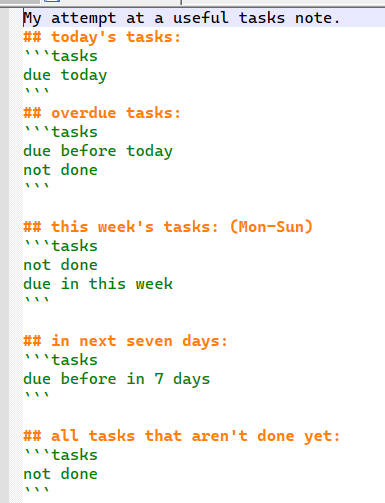
To actually view the tasks, I have a “task note” with a number of task queries on it. For now, it looks like this:

task note

(I tried to insert the code here, but WordPress got confused, so I’m just putting a screenshot here.)

So not too fancy. I’d really like to find a way to format this a bit better. Maybe in a table? If there’s a way to show task info in a “base”, I haven’t figured it out yet. I did use a base to show all of my Evernote reminders, and that worked well. I might as well stick that in here too:

views:
  - type: table
    name: Table
    filters:
      and:
        - '!note["EN-Reminder"].isEmpty()'
        - note["EN-Reminder-Done"].isEmpty()
    order:
      - file.name
      - EN-Reminder
      - EN-Reminder-Done
    sort:
      - property: EN-Reminder
        direction: ASC

This is basically showing all notes that had an Evernote reminder, but did not have a “reminder done” date.

In working through my reminders/tasks, I’ve noticed that a lot of them are just reminders to review a given annual subscription before it renews. I think I might look at seeing if there’s a way to categorize these specific tasks and separate them out. Maybe a “#subs” tag or a property. And once I started thinking about properties, I started thinking that I could have a specific type of note with a number of specific properties that I could use to organized my subscriptions. Maybe properties for renewal date, cost, URL, and so on. Well, that’s a project for later maybe.

Images

I may have gone a little overboard with image cleanup today. I installed this plugin, which is a simple little script that renames all images on the current note to match the note title. So, for instance, ‘IMG_1234.jpg’ becomes ‘drivers license 2014.jpg’. It only does this for one note at a time. So I went through my main archive folder and ran it on, probably, around 400 notes. And did some general note cleanup along the way.

I think I need to stop myself from going overboard with miscellaneous note cleanup. It’s easy for me to go down a rabbit hole of doing low-value file maintenance tasks and losing sight of the big picture. This has been a problem for me, in general, really. Obsidian really gives me an opportunity to waste a lot of time fiddling with unimportant stuff, and I need to watch out for that.

(Update: I had some sync issues after all of those image file renames, so I think I’m going to delete the plugin linked above. I don’t know if the sync problems were due to the plugin, or something else, but… better safe than sorry. And I’m hoping that the kind of sync issues I just had aren’t common with Obsidian sync. If they are, then I’m going to need to go back to Evernote!)

Evernote to Obsidian, work in progress

As per my previous post, I went ahead and migrated myself from Evernote to Obsidian yesterday. I’m now almost at the point of no return. (Or at least at the point where I’d have wasted a lot of effort if I were to throw it away now and go back to Evernote.)

I used Yarle for the migration. I’d done several experimental, partial, migrations first. For the final migration, I did all of my Evernote notebooks all at once. (I had a thought in my head that Yarle might resolve cross-notebook links if I did that.) The migration went pretty smoothly, but Yarle seemed to lock up at one point. I checked the count on the output files, and it seemed like it had created all of them, so I did an “end task” on it and proceeded from there.

In the end, I’ve wound up with a lot of broken links. I’m starting to wonder if killing the Yarle process was a mistake. Maybe it had created all of the .md files, but was still reconciling the links? I don’t really know enough about how Yarle works.

Either way, I’m now cleaning up hundreds of broken links. With the broken links plugin, I’m able to at least identify them easily. There are actually two different kinds of broken links in my vault now: there are many ‘regular’ broken Markdown links; I can ID those with the plugin. Then, there are links that point out to share.evernote.com, which didn’t fully get converted to Markdown links. Those are technically ‘valid’ links, but of course they open up my original Evernote notes in a web browser, so I’ll need to clean those up too.

I started doing the link cleanup manually, but at some point, I saw how big the job was getting, and decided to write a couple of helper scripts. With the help of Kagi Assistant, I wrote two PowerShell scripts. The first cleaned up links where Yarle had left them in a format like this:
[[guid/guid|name of link]]
In that case, I wanted to change them to:
[[name of link]]

Here’s the script I used:

 Get-ChildItem -Recurse -Filter *.md | ForEach-Object {
    $content = $_ | Get-Content -Raw
    $new = [regex]::Replace($content,
        '[[[0-9a-f]{8}-[0-9a-f]{4}-[0-9a-f]{4}-[0-9a-f]{4}-[0-9a-f]{12}/[0-9a-f]{8}-[0-9a-f]{4}-[0-9a-f]{4}-[0-9a-f]{4}-[0-9a-f]{12}|([^]]+)]]',
        {param($m) "[[{0}]]" -f $m.Groups[1].Value},
        'IgnoreCase'
    )
    if ($new -ne $content) {
        $_.FullName                    # show changed file
        Set-Content -NoNewline -Path $_.FullName -Value $new
    }
 }

And for the second case, I wanted to clean up the external Evernote links, like this:
[name of link](https://share.evernote.com/note/guid)
To again change them to this:
[[name of link]]

So here’s that script:

Get-ChildItem -Recurse -Filter *.md | ForEach-Object {
    $content = $_ | Get-Content -Raw
    $new = [regex]::Replace($content,
        '[([^]]+)](https?://share.evernote.com/[^)]+)',
        {param($m) "[[{0}]]" -f $m.Groups[1].Value},
        'IgnoreCase'
    )
    if ($new -ne $content) {
        $_.FullName                    # print the altered file
        Set-Content -NoNewline -Path $_.FullName -Value $new
    }
}

I didn’t even really test these scripts, I just backed up my vault, then ran them. And, surprisingly, they seemed to work right on the first attempt.

So that got me through most of the link cleanup. I then did a bunch of manual fixes, and just kept going until the “broken links” list was empty.

(I may have mixed up my tenses in this post. I started writing it as I was working on the migration, and finished it after I got all the link cleanup done. Sorry.)

My next task will likely be attachment cleanup. I guess that’ll go in yet another blog post!

from Evernote to Obsidian, take two

I got an email from Evernote last week letting me know that my subscription price would be increasing to $250/year, effective January 7, when my annual subscription renews. It had gone up to $130/year in 2023. Prior to that, it was $70/year.

I’m not really unhappy with Evernote as a product, or with Bending Spoons as a company, but the price on it is getting a bit ridiculous. Here are some links to articles/videos of other folks talking about the price increase:

I had previously experimented with moving to Obsidian, in 2023, but didn’t go through with it. But now, it’s looking like I really need to do something. Maybe I could afford $250/year for Evernote if I thought they were going to stick with that price for the foreseeable future, and continue making the app better. But I’m just not convinced that they’re on a good trajectory, in terms of my own personal use-case for the product.

Cory Doctorow coined the term en****tification a while back, and it’s a useful term, though I wish he had come up with something that didn’t incorporate one of George Carlin’s seven dirty words you can’t say on TV. Still, it’s a good term. Here’s a Metafilter discussion on the (let’s call it) enpoopification of note-taking software, from 2023. I’m not sure if Evernote really falls into this category, but you could make a good case for it.

So, anyway, I’m back to experimenting with Obsidian. Luckily, I’m taking this coming week off from work, to use up my vacation days for the year, so I’ve got the time for it.

I’ll probably post more about this when I get farther along, but I thought it would be useful to write up some initial notes, informed by my previous efforts, and by watching a whole bunch of YouTube videos.

I’ll start with the process of importing from Evernote. For that, I’m using Yarle. Obsidian now has an official importer for Evernote, but I think Yarle is probably still better. Looking at the commit history on Yarle in Github, I see that the author has continued to work on it. Having tried it out again, I’m not sure if it’s working better than it was in 2023, but it’s definitely working well enough, I think.

I’ve been tweaking my template for Yarle. Here’s what I’ve got at this moment:

---
{title-block}EN-Title: "{title}"{end-title-block}
{created-at-block}EN-Created: {created-at}{end-created-at-block}
{updated-at-block}EN-LastUpdated: {updated-at}{end-updated-at-block}
{source-url-block}EN-SourceURL: {source-url}{end-source-url-block}
{reminder-time-block}EN-Reminder: {reminder-time}{end-reminder-time-block}
{reminder-done-time-block}EN-Reminder-Done: {reminder-done-time}{end-reminder-done-time-block}
{tags-yaml-list-block}Tags: {tags-yaml-list}{end-tags-yaml-list-block}
---
{content-block}{content}{end-content-block}

So I’m putting a bunch of stuff in the “frontmatter” of the note. This stuff is mostly just there for reference; I won’t actually need it going forward. I plan on converting Evernote’s reminders into Obsidian tasks, either manually or via a script or something. And the tags block seems like the cleanest way to get the tags over from EN.

The only setting in Yarle that I’ve changed from the default is to set “store attachments in notebook level” to yes. I’m still not sure about the way I’m dealing with attachments, but I think this is good enough.

As for my Obsidian setup, I think I’ve settled on a batch of plugins that’ll give me most of the functionality I need (with some compromises and caveats). Here’s the list:

  • Notebook Navigator – This is a great one that allows you to get your Obsidian screen to look a lot more like what I’m used to with Evernote. Getting this installed got me past a lot of my hesitation with Obsidian.
  • Omnisearch and Text Extractor – These two should bring some decent search functionality to Obsidian.
  • Tasks – I’m going to try to replace the Evernote reminders functionality using Tasks. I know I won’t be able to do a lot of the stuff that Evernote can do (email reminders for instance), but I think I can get a workable system cobbled together.
  • Broken Links – I’m using this to identify broken links in my imported notes. I’m seeing a lot of problems there, actually. I won’t get into the details here, but I’m going to have a lot of fix-up to do, I think.

Whew. So maybe that’s enough for this blog post. I intend to spend a bunch more time working on this tomorrow.

One thing I want to do this time is to make a relatively quick decision to either switch over or not, and to go all-in on Obsidian if I do. I don’t want to dither on it, and wind up having to renew my Evernote subscription, then spending a lot of time flipping back and forth between the two systems. (I’m kind of doing that with Raindrop.io and Pinboard right now, and it’s not optimal.) Sink or swim!

WordPress, business books, and some health stuff

It’s Sunday morning. I’ve made it through another week. I’m going to start writing this post as a stream of consciousness thing, and see where it goes. I have a bunch of thoughts in my head, as usual. Maybe this will come together into something coherent. Maybe not.

WordPress

There is a bunch of crazy stuff going on right now between WordPress / Matt Mullenweg and WPEngine. I’m not going to try to summarize it or link to any of the many articles and blog posts about it. I went down a hole this morning reading some of them, and I don’t think I came out of it with any useful knowledge about which side I should take (if any) and what (if anything) I should be doing. I guess I’ll be sticking with WordPress for the time being. This doesn’t seem to have devolved into something like the Twitter situation, where the whole thing has been turned into a nazi bar, and the only option was bailing out.

Maybe I should think about switching to Drupal! I haven’t touched Drupal in more than a decade, but it’s probably still fine, right? I haven’t read anything about Dries Buytaert going off the deep end. (Though, now that I’m looking at his Wikipedia page, I’m reminded of the Larry Garfield thing from several years back. Again, no clue who’s right and who’s wrong on that… Sigh.)

Business Books

In between Wheel of Time books, I’ve been reading a few relatively short business books. I mentioned Thinking in Systems a couple of weeks ago. I’ve since also read a couple of books from Seth Godin’s Domino Project, from several years back. Honestly, I don’t remember why I was engaging with that stuff back when it was first coming out. I guess I had some kind of self-improvement thing going… maybe this was concurrent with my David Allen / GTD thing? I don’t know. Anyway, I have several of those books in my Kindle library but never got around to reading them.

I read Do the Work By Steven Pressfield last week, and I’m most of the way through Read This Before Our Next Meeting by Al Pittampalli. Neither or these really seems like something I needed to read right now. I was hoping the latter book might help me figure out how to deal with the barrage of meetings I’ve been dealing with recently, but it wasn’t that helpful.

I’m not happy with the number of meetings I have to attend at work these days, and sometimes it seems almost comic (like the one meeting on Thursday that required two separate prep meetings for it, on Tuesday and Wednesday). But there’s not much I can do about any of that other than grin and bear it.

To get back to my reading, I guess I’m about done with business books for now. I should probably start reading Towers of Midnight today, and see if I can get through the prologue. Reading these books is bringing me so much joy. I’m almost embarrassed to admit it, given that I kind of looked down on them for so many years.

My Health

I had a move streak going on my Apple Watch for quite some time. I gave up on it this week. It lasted for 52 days, which is pretty good. And the most interesting thing about it, to me, is that this means I haven’t been sick for almost two whole months! I even went to see a movie a couple of weeks back, and didn’t get sick. (Though this was a niche Paul McCartney movie, and there were maybe a dozen people in the theater, so not a typical crowded theater thing.) I need to watch myself though: I just noticed that it’s the one year anniversary of my bout with COVID last year. So I’m still going to play it safe and skip NYCC next weekend.

some random links

I’m continuing to feel better today (see previous post), though I’m still not enjoying the “Paxlovid mouth” side-effect. I’m currently masking it with some apple juice.

I spent some time at the computer today, paying some bills, and catching up on some miscellaneous stuff I was neglecting while sick. I thought I’d put together a link post, with a few random things I stumbled over today.

  • The Coronavirus Still Doesn’t Care About Your Feelings – from The Nation. I don’t really have anything to say about this, but thought it was relevant to my current situation.
  • The cult of Obsidian – from Fast Company. I’ve mostly given up on Obsidian, and have decided to remain with Evernote for now. But I still think Obsidian is interesting, and I may return to it at some point. I’m a little interested in maybe picking up David Sparks’ Obsidian Field Guide, now that it’s out, though there wouldn’t be much point in that, if I’m not going to use Obsidian.
  • I just saw the news that JHU in Manhattan has closed, via this interview at The Beat. I’ve been going to JHU since back when it was in A&S Plaza. So that’s got to be back in the early 90s, since it was only called A&S Plaza from 1989-1995 (per Wikipedia). I always liked that store, both before and after Jim Hanley retired. Mind you, I haven’t been there in a while. I can’t really remember the last time I was there. In more recent years, I’ve been more likely to stop by Midtown Comics, mostly just because I’m more likely to pass by there on my way to or from Penn Station.

I’ve skimmed some of the news coming out of NYCC, but there’s not much that caught my eye. I looked at the Harvey winners, and there’s some interesting stuff in there. Having just spent a week at home, sick, you’d think I would have done some comic reading, but nope. I didn’t really have the energy for it earlier in the week. Then, on Wednesday, I decided to start watching Only Murders In The Building, and that kept me out of trouble from Wednesday through Friday. (I watched one season per day.) I should probably talk myself into doing some reading today and tomorrow, but I’m still not sure I have enough energy for it.

still dithering on Obsidian and Evernote

Well, I’m still dithering back and forth on whether or not to give up on Evernote. I guess that’s a solid month of dithering now. I’m fairly certain, at least, that if I do give up on Evernote, I’m most likely to migrate to Obsidian.

I’ve been doing a lot of experimentation with Obsidian. And I’ve done a lot of exports from Evernote with Yarle, trying to find the right settings for the smoothest migration. I think now might be a good time to write up some notes on all that.

I’ve got a few issues with the simple fact that Obsidian’s files are plain-text Markdown, while Evernote’s are rich text. Yarle does a good job of converting most of the rich-text stuff to equivalent Markdown, assuming the formatting isn’t too fancy. But I’ve hit on a couple of gotchas. The biggest is that I frequently use pound signs (#) is my notes for things like comic book issue runs, like “Spider-Man #1-6”. That’s fine in Evernote, but Obsidian interprets the “#1-6” as a tag named “1-6”. So I’d have to  clean a bunch of that up, either before or after the export. I’d either have to remove the pound signs, or escape them with a backslash.

I’ve also found that Yarle doesn’t always get cross-notebook links right. So I’d have a bunch of those to clean up (unless I can figure out why Yarle is doing that, and fix it at the source). And Obsidian doesn’t see a link that doesn’t go anywhere as an error; it’s really more of a feature. When you click a link that doesn’t point to an exiting file, Obsidian goes ahead and creates the file. So there’s no way to get a good list of all the broken links.

On the plus side, I think I’ve figured out a workable way to include my note reminders in the export as Dataview inline fields, which I can then summarize with a Dataview query. I’m not sure if that’s what I’d want to do long-term, but it would at least allow me to have a list of the notes with reminders on them, so I can go from there.

Searching for text in images isn’t a built-in feature with Obsidian, but you can get it with the Omnisearch plugin, paired with the Text Extractor plugin. In my experiments, it’s not nearly as good as Evernote’s OCR and image search, but it’s something.

Overall, I’m now at a point where I feel like Obsidian would be workable for me, but there would be some trade-offs, compared to Evernote. If Evernote truly seemed to be circling the drain, I’d go ahead and jump ship. But, while there’s been a lot of negative talk about Evernote recently, they honestly seem to be doing fine, as far as I can see. I haven’t had any hiccups with the client software recently, on Mac, Windows, or iOS. And I haven’t had any sync problems either. So it’s hard to talk myself into dropping something that’s working reasonably well for me.

Obsidian resources

I’m still spending a lot of time messing around with Obsidian, trying to figure out if I can migrate from Evernote, and if I want to. I have a bunch to say about all that, but I’m going to start with a list of resources that I’ve been looking at.

There’s quite a lot of material out there on Obsidian: podcasts, videos, blog posts, etc. That’s one of the reasons why it seems worth considering. If it wasn’t good, there wouldn’t be so many people out there producing content around it. (On the other hand, there’s a lot of content out there on the internet about some pretty questionable stuff, so maybe I shouldn’t read too much into that…)

Training

There are a bunch of paid training options out there, usually in video form and running around $200 for a course. Here’s a thread from MPU Talk on the subject. A few of the examples below came from that thread.

  • Nicole van der Hoeven has a course called Obsidian for Everyone, for €200. I’ve watched some of her YouTube videos, and they’re pretty good.
  • Mike Schmitz has something called Obsidian University, which costs $150 USD. Schmitz is a co-host of Focused, with David Sparks. I don’t listen to that podcast, but I generally trust David Sparks, so I’d assume he’s legit, at least.
  • The Sweet Setup has something called To Obsidian and Beyond, for $200 or $500, depending on which tier you buy. Mike Schmitz was also involved with this course. I think it predates his Obsidian University, but I’m not sure.
  • And then there’s Obsidian Flight School, which costs $129. There appears to be a lot of content in this one. This is from Nick Milo. I’m not really familiar with him, but I’ve watched one or two of his YouTube videos.
  • And finally, there’s Obsidian Fundamentals and Obsidian Onboarding from Danny Hatcher. There are a few tiers to his stuff, with the highest being £199. I’m not too familiar with him, but he also has a lot of videos on YouTube.

I haven’t tried any of these out yet, and I don’t know if I will, but it’s interesting that there’s so much out there. (And, by the way, I couldn’t find anything on Obsidian on any of the training channels I currently have access to: Pluralsight, SkillSoft, and LinkedIn Learning.)

Podcasts

I’m not aware of any podcasts that are specifically about Obsidian, but Obsidian is a subject that comes up on a few podcasts that I follow either regularly or occasionally.

  • Mac Power Users: MPU has a number of episodes talking about Obsidian, since David Sparks is a big Obsidian user. There’s one episode in particular, 583: The Obsidian Deep Dive, that devotes the whole show to Obsidian.
  • Automators, likewise, devoted a whole episode to Obsidian: 109: Automating Obsidian.
  • AppStories did a four-part Obsidian In Depth series that starts here. Federico Viticci is a big fan of Obsidian, and there’s a lot of Obsidian coverage on AppStories and MacStories.
  • MetaMuse did an episode recently interviewing Stephan Ango, CEO of Obsidian. I found this episode to be particularly useful in figuring out a bit more about the company that’s behind Obsidian, and what their philosophy is, and how likely they are to remain on a course that’s consistent with maintaining a product that continues to be useful. (I had a hard time phrasing that sentence… Many tech companies are more about getting to an IPO or maximizing revenue or growth or whatever than they are about releasing and maintaining a good product. And the “maintaining” part is usually the sticking point…)
  • Somewhat related: I listened to an episode of Taming The Trunk recently that featured an interview with Federico Simionato, the current product lead on Evernote at Bending Spoons. Similar to the MetaMuse episode above, it gave me some insight into the current owner of Evernote, and their philosophy and plans for the product.

As you can see, I’ve been spending a lot of time researching and learning about Obsidian this week. I still haven’t convinced myself to migrate over from Evernote though. Some of the experimenting I’ve done has, at least, gotten me to clean up my Evernote data a bit, and has gotten me to think a bit deeper about how and why I use these kind of tools.

And, since Evernote has been my “second brain” for more than ten years now, going through the data in my account has sent me down some rabbit holes, remembering old jobs, old projects, and old friends. Some of that has been pleasant and some of it hasn’t. (Insert Comic Book Guy “Oh, I’ve wasted my life” meme here.)


Evernote alternative experimentation

I decided to do a bit of experimentation with Evernote alternatives today. I’m not quite done, but I thought I’d take a break to write up some findings, so far.

My first idea was to see how feasible it would be to use Evernote2Onenote to convert from Evernote to OneNote. I exported two notebooks from my Evernote install. One is a fairly small notebook (less than 200 notes) that’s just an archive of some old work notes. The second is my main archive notebook, where I move things that aren’t active anymore, so that’s a pretty big one (more than 1000 notes). The ENEX file for the first one was 17 MB, while the second was a bit over 500 MB.

I imported both of those into OneNote, with no issues. The smaller notebook took less than a minute, and the larger one took just about five minutes. The importer sets the date on the OneNote notes based on the date in the ENEX data, so that’s good. And it does a good job of preserving formatting from the old notes. And as far as I can tell, it kept all of my images intact. There’s no option as to which notebook or section the import goes to, so that’s a bit weird. It just put them all into what I presume is the default notebook/section for me. It’s not hard to move notes, once they’re imported, so that’s not really a problem.

My tags all disappeared. I wasn’t sure what would happen to them, but I was hoping they’d be maintained in some way. There’s a note on the web page that says “Notes are imported to OneNote in a tab that has the same name as the tag the note has.” So that made me think that it would create new tabs for each tag, and sort the notes out that way. But that didn’t happen. Then I thought that maybe I had to create the tabs manually first, so I did that and tried again, but that didn’t work either. I guess that, if I’m going to switch to OneNote, I’m going to have to give up on tags anyway, so maybe I shouldn’t worry about it.

(It’s occurred to me that I could write a little program to parse through the ENEX file and move the tags into the body of the note, so I’d be able to keep them that way. But that seems like too much work.)

Next, I decided to try Yarle to convert the notes to Markdown. That worked reasonably well, and reasonably quickly. There are a bunch of options in Yarle (as compared to Evernote2Onenote, which has almost none). I left them all at the defaults, and selected Obsidian for the Markdown dialect.

Yarle left me with a folder of Markdown docs and a “resources” folder with all the images and other file attachments. One nice thing I noticed is that Yarle sets both the created and modified dates on the files according to the data from the ENEX file, so that’s a nice touch.

From there, I installed Obsidian, created a new vault, and moved all of the Yarle files into it. I found that the end-result here is a bit hairier than I got with the OneNote import. And that makes sense, since Markdown is a text format, and converting rich text to Markdown is always going to be a compromise. On the plus side, all of the metadata I need (tag list, created date, modified date) is all there in the note. But it’s all at the top of the note, and looks kind of weird. I think I could fix that by using a different import template with Yarle, and I might try that later.

While the tags appear in the body of the note, they don’t seem to be recognized as tags in Obsidian. I don’t know enough about Obsidian to know if that’s easily fixable or not. Maybe that’s something else I need to fix in the Yarle template.

And I decided to try one more system, Joplin. Joplin has a built-in Evernote importer, so I used that. It gives you options to import as Markdown, or as HTML. I chose the Markdown option. This was pretty fast, and it brought in the tags and images, no problem. It also kept the created/modified dates (or at least one of those dates. Not sure which one.) The resulting Markdown was usable, but had been pretty much stripped of any formatting. Images were retained.

I then imported the same notebook, but selecting “as HTML” this time. That gave me notes that looked a bit closer to the originals, but the HTML itself was quite messy. So I definitely don’t want to stick with that.

Behind the scenes, Joplin doesn’t store its notes in text files, like Obsidian does. It appears to store them in a SQLite database, in a joplin-desktop folder under your Windows user folder. Any attached images are stored in a “resources” folder under that, with file names that appear to be GUIDs.

So, looking at what I’ve done so far, and trying to summarize it, here’s what I’ve got:

  • The OneNote importer seems to be the easiest and best way to get my notes into a stable system, with minimal loss of formatting or any other issues. But the big issue there is that I’d have to be OK with losing my tags (or figuring out a way to keep them). And it’s a plus that I’ve been using OneNote at work for more than ten years, so I know how it works.
  • The combo of Yarle plus Obsidian can probably get me a workable system, retaining tags, but losing a lot of formatting. I’d need to do some more experimentation with Yarle templates and options to get it to where I want it though.
  • Joplin can likely get me to a working system pretty easily, with tags intact, but a lot of formatting lost. I’d have a learning curve with Joplin, but I suspect it would be much less of a curve than with Obsidian.

(And, by the way, this was all done on my Windows PC. I haven’t tried any of this stuff out on a Mac, or on iOS.)

Having gotten this far, I also decided to play around with sync a bit. OneNote wasn’t a problem, really, since I’m already using OneDrive. But it did choke on the initial sync of my bigger notebook, and gave me a bunch of sync errors. That seems to have smoothed out now.

For Obsidian, I stored the vault under my OneDrive folder, so that will automatically sync up to the cloud. I’m assuming I can just point at it on my Mac, and that should work. I’m not sure how that’ll work on iOS, if it does at all.

And for Joplin, I just ran through the setup to tell it to sync via OneDrive. It appears to have OneDrive specific support built in, as I was asked to authorize it. It then created a folder under Apps/Joplin, and pushed out a bunch of individual Markdown files and other files. I’m a little worried about how reliable that will be, but I’m willing to give it a try.

I’m not greatly impressed by the user interface of either Joplin or Obsidian, though they’re both probably fine. Joplin seems simpler, and closer to Evernote. The default view is a dual-pane view, with the editable Markdown on the left, and a WYSIWYG preview on the right. There’s a rich-text editor, but if you switch to it, you get a warning notice about it, so that’s a little worrying. I’m not sure I’d want to deal with that, long term.

Obsidian defaults to a rich-text editor, which is nice. You can toggle to “source mode” if you want to see the markdown. I think I could get used to Obsidian’s user interface, though I think I’d need to spend a good bit of time tweaking it, messing with plugins, and so on.

Well, that took up a lot of time this morning, and I’m not entirely sure where I want to go next. I still haven’t evaluated macOS or iOS versions of Obsidian or Joplin. And I haven’t looked at how either could handle task management, beyond simple note-taking, which is kinda important to me.

I’ll still thinking that the path of least resistance (aside from sticking with Evernote) would be to switch to OneNote.

Dithering on Evernote again

For the last few years, I’ve been flirting with the idea of switching from Evernote to something else. I’ve spent a lot of time dithering back and forth, but I never decide to switch. I started thinking about it again this week, after noticing this post on Hacker News about most of Evernote’s staff being laid off. (And here’s an article from SFGate that fills in some details.)

Evernote was purchased by a company named Bending Spoons a while back, and it seems like this move is just to essentially shut down Evernote’s old US operation and move the work over to the new owner’s offices in Europe. So it’s maybe not as bad as the headline “Nearly all of Evernote’s remaining staff has been laid off” sounds. But it got me looking at alternatives again.

There was some discussion of the HN post on Mastodon and Reddit, so I looked at the discussions there (and on HN too of course) and went down some rabbit holes. So I thought I’d write up a blog post with some of my findings and thoughts.

The first mention of Evernote on my blog is from back in 2005. And looking at my actual Evernote account, I see that I started using it in July 2008. And I know that I started using it heavily in 2013/2014. So it’s been my main note-taking / task management system for about a decade.

In addition to the acquisition, layoffs, and general turmoil at Evernote, they’ve also put through a price increase, so Evernote Personal now costs $130/year, which is pretty steep. But price isn’t my main concern. I’m more worried about whether or not the new owner will keep both the front-end software and the back-end infrastructure up & running smoothly.

So here are some alternatives I’ve looked at, and some notes on each.

Notion

A lot of people seem to like Notion. It can import from Evernote, so that’s one item checked off my list. It also allows you to attach reminders to notes, which is another one of my must-have features. Pricing is $96/year for their “Plus” tier, which is probably what I need. So, less expensive than Evernote, but still not cheap.

But it also potentially has the same issue that a lot of people are having with Evernote: It’s a VC-funded startup that’s liable to run out of money, or get acquired, or whatever, and that could screw things up.

Two other possible negatives: (1) it’s using its own proprietary file format, and (2) it’s using its own sync back-end.

Obsidian

Obsidian is a popular Markdown-based note-taking app. It’s also a commercial product, but from a much smaller team, and not reliant on huge wads of VC cash. It’s free for personal use. If you want to use their sync back-end, that costs $96/year, the same price as Notion’s Plus tier.

My concern with it is that it’s primarily a plain-text product. That’s both a good thing and a bad thing, really. I appreciate that my data will all be in plain-text files, rather than a proprietary format. But I use Evernote as a place to dump image files and PDFs too. That’s possible with Obsidian, but I’m not sure about how robust the support is, or how easy it is to use.

There are a ton of plugins for Obsidian, and I suspect that a lot of the stuff I want to do would be supported by a plugin. But I’d have to play around a lot to figure out how well that would work.

Joplin

Joplin is an open-source competitor to Evernote. I’m pretty sure that it was specifically designed to be an open-source Evernote alternative. It supports importing from Evernote, so that’s good.

The app is open-source and free to use. There’s a paid sync service, if you want it. The prices are all in Euros, but it looks like the basic tier would cost around $20/year and the pro tier would be around $63/year. So that’s reasonable.

I’m not sure that Joplin has enough task management features for me, but otherwise, it seems to be pretty solid.

OneNote

Microsoft’s OneNote should probably be my preferred alternative. It’s got a lot going for it. I already subscribe to Microsoft 365, so I’m already paying for it. It’s from a large, stable, company, and it’s used by (probably) millions of people, so it’s not likely to be going away any time soon. And I use it extensively at work.

But I don’t use it at work because I like it, I use it because it’s the only approved note-taking app at my company. I know it well enough to know that it won’t work well as a full task-management system. If I wanted to stay in the Microsoft ecosystem, I could probably pair it with Outlook reminders and/or Microsoft To Do to get what I want. But I’m not sure I want to do that.

OneNote used to have an Evernote importer, but it seems that they discontinued that a while back. So I’m not sure how I’d get my notes from Evernote into OneNote. There’s a third-party tool that might work, though it looks kinda iffy.

Conclusions

So that’s four options. I looked at a bunch of other stuff too, but I’m (for now) rejecting anything that isn’t cross-platform (Mac, Windows, and iOS/iPadOS), so that eliminated some interesting Apple-only stuff.

Note synchronization is a big thing for me, and I’m not sure how some of these options are at it. With Evernote, I frequently switch between my Windows desktop, my MacBook and my iPhone and iPad, and it’s frustrating any time the sync doesn’t work seamlessly. If I only had Mac and Windows to worry about, then I could use one of the options that lets you keep your notes in local Markdown files, and just rely on OneDrive for sync. But I’m not sure how that would work on iOS, and the documentation on some of these apps doesn’t do a good job of getting into details on that.

I’ve also considered doing my task management in a separate system, like Todoist or Remember The Milk. But that adds an extra bit of complexity and cost that I’d like to do without, if I can.

And, to bring things full-circle, I came across a thread on the MPU forums this morning from somebody who left Evernote, and now kinda regrets it, and is thinking about going back. So maybe I should just stay put!


General learning stuff

First, a little follow-up from my last post: The Credly thing was a little weird. There’s a working LinkedIn integration that will add the credential to your profile and let you post about it. So that’s good. There are options to share to Twitter and Facebook too, but neither worked. I manually posted the credential link to Facebook, Twitter, and Mastodon, just for yuks. So maybe I’ll get some “likes” out of that. Not that it matters, but I crave attention and validation, like most 21st-century humans.

On the broader topic of education: I’ve been working on figuring out some of the newer .NET Web API stuff lately. My existing .NET Web APIs are all .NET 4.x. Until recently, I hadn’t tried to create one under ASP.NET Core. I’ve been working my way through this course on Pluralsight.

I still get access to Pluralsight through work, which is great. My company recently discontinued access to Percipio though. I wasn’t really using Percipio that much, and I still have access to it through ACM, so it’s no big deal that work has stopped paying for it. That got me thinking about O’Reilly Learning again. When I got the email telling me that we were dropping Percipio, I responded with a suggestion that they look into O’Reilly. I don’t have much hope that our L&D folks will want to spend the money on O’Reilly, but I thought I’d suggest it. You never know.

Our L&D folks (and I guess someone influential in management) have been pushing a lot of leadership stuff lately in a couple of areas that I wasn’t previously familiar with. First is John C. Maxwell’s 5 levels of leadership. I guess that Maxwell is actually a pretty big name in the “leadership” area, though I’d never heard of him. He’s written a bunch of books. I’m considering picking up the 5 Levels of Leadership book, either in Kindle or Audible format. I’ve got mixed feelings though. On the one hand, I want to learn stuff that might be important and help make me a better manager. On the other hand, I’m about halfway through the third Wheel of Time book, and I don’t want to get off track on that.

The other big thing they’re starting to push at work is something called Emergenetics, which sounds pretty fishy to me, but is apparently not a weird pseudo-religion or anything like that. I don’t have much to say about it, since i haven’t really started looking into it yet.

I’m not really sure where these two initiatives came from. It might be somebody in L&D, or somebody in management. We do have a bunch of new high-level managers that have been hired from outside recently. We used to get most of our high-level managers from internal promotions, but I guess our president wanted to bring in some fresh blood. Overall, there’s a good bit of uncertainty in the company, due to all of the new managers coming in, and various changes going on. I’m trying to take a “wait and see” attitude, and keep an open mind.

I do have three direct reports now, so I should probably try to keep up on the management philosophy stuff. I haven’t really been an active manager in a long time. And, since they made me a manager about six months ago, I’ve actually done very little management. I’m mostly just letting my direct reports do their work, and leaving them alone. But I should probably try to more actively engage with them. At some point, I’ll probably have to do performance reviews, so I guess I should at least engage enough to be able to do that properly.

It’s hard to juggle all of this. I want to keep up on all the technical stuff, like ASP.NET and Power Platform, and so on, but I also need to work on the “soft skills” stuff.