Project Euler is offline

I was surprised and disappointed to see that Project Euler was offline, as of yesterday. The message they’ve posted on the home page makes it sound fairly serious, and it doesn’t sound like they’re 100% sure they’re going to be able to bring it back up any time soon.

I can’t understand why anyone would hack into something like Project Euler. It’s free, so there’s no money involved, and no credit card numbers to steal. It’s not political, so there’s absolutely no ideological reason to want to bring them down. And it’s not popular enough to the point where a hacker would do it just for the media attention.

I guess there might be some value in their password database, but I think most of their users would be internet-savvy enough that they wouldn’t likely be using the same password across multiple accounts. And if that’s what they were after, there must be better targets for that than Euler.

Their forum site is still up, and there’s some discussion about the problem here, but no information from the admins as of yet. And there’s a thread on reddit talking about it, which includes links to some other interesting programming puzzle sites.

Beginning COBOL for Programmers

Holy cow, somebody actually published a new book on COBOL this year. I haven’t touched COBOL in years, and I don’t plan on touching it again any time soon. But I guess I shouldn’t laugh too much at the idea that COBOL skills are still relevant.

Git cheat sheets

I’ve been a big fan of Mercurial for several years now, and, all other things being equal, I’d likely use it for all of my version control needs for the foreseeable future. But, in the real world, git has gotten a lot more traction than hg. Support for git is integrated into XCode, Xamarin Studio, and newer versions of Visual Studio. And the git command-line tool is available on my 1&1 account, but hg isn’t. So I’m putting a little effort into learning git. I’ve done enough with git to be able to take care of the basics, especially if I’m using a GUI, but I can never quite remember all the ins and outs of the command-line. So I went looking for a good PDF cheat sheet I could print out and keep handy.

I found two good ones. Here’s one from Atlassian, and another from Github.

I’m thinking about putting my WordPress directory on 1&1 under git, so I can pull down a local copy with ease, and roll back questionable updates, and stuff like that. So that’s one more little project related to the blog. Hey, if it helps me learn my way around the git command-line, that can’t be a bad thing, right?


Learning F#

I’ve been curious about F# for quite some time, and I recently decided to pick up a few books on it, and see if I could learn it. More generally, I wanted to learn more about functional programming. I thought about learning something like Haskell or Scala, but F# seemed like a good choice. I already know a good bit about the .NET Framework, and the CLR, so I wouldn’t be starting entirely from scratch, and I could stick with tools I already know (Visual Studio).

The three books I picked up are F# for C# Developers, Book of F#, and Programming F# 3.0.I bought them all from as DRM-free e-books from O’Reilly. (This was right before O’Reilly lost the license to sell Microsoft Press books, so the “F# for C#” book would no longer be available from them, if you were looking for it.) I haven’t started the “Programming F#” book yet, so I can’t say anything about it. But I have read a few chapters from each of the other two books.

“F# for C# Developers” is published by Microsoft Press. It’s reasonably well-written, but I haven’t really found it to be particularly engaging or interesting. Of the chapters I’ve read thus far, I’d say that it lives up to its name, in that it is oriented to folks with a good grounding in typical .NET development. I think it would make for a good reference book to keep at my desk, if I was doing some serious F# development at work, and needed to remember the difference between :> and :?>, for instance.

Given that I didn’t feel like I was really learning functional programming from that book, I decided to put it down and start reading “Book of F#”. For my purposes, this is turning out to be a better book. I’ve read the first four chapters so far, and I’m finding that I like the tone of it (including Doctor Who references!), and the general style. I’m finding the example code to be a bit more understandable and interesting than in the other book.

I’ve experimented a bit with re-doing some of the Project Euler problems in F#, as I’ve mentioned before, and I’ve found that to be a good exercise too. Oh, and I’ve solved through to problem 31 there, so I’ve managed to make some overall progress on Project Euler.

Spring Cleaning

I received a letter from my landlord this week notifying me that they would be coming through on Monday and spraying for bugs. The letter said that I should clear off my kitchen counters, and move everything out from the cabinets below the counters, and from under the bathroom sink. I only recall them sending out a notice like this once before, maybe seven or eight years ago. As far as I can tell, we don’t actually have a pest problem, but maybe there’s an issue elsewhere in the building.

Either way, I took this as an opportunity to do some spring cleaning this morning. In addition to throwing out a bunch of random stuff from the kitchen, I also decided to toss out a bunch of old computer books. I threw out maybe 30 or so books. I’ve done this before, and probably blogged about it, so I’m not sure if I’l be saying anything new here. But I wanted to take a break from cleaning and write up a blog post, so here we are.

I haven’t been buying a lot of hard-copy computer books lately, preferring DRM-free e-books instead. At my current job, I have exactly one hard-copy book at my desk. I also have three e-books on my computer that I refer to regularly. At my previous job, I kept maybe a half-dozen hard-copy books on my desk, and a few e-books. At the job before that, I had a whole bookshelf unit, probably six feet tall and three feet wide, full with books (and admittedly a large array of random knick-knacks), most of which I’d bought myself. I left quite a few of them behind when we went out of business, but I took a couple of boxes of them home; most of those went into the recycling dumpster today.

I’ve been buying most of my e-books from O’Reilly. Generally, I wait for them to have a good sale, as they did last week, on the Day Against DRM. Packt had a really good sale too, any book for $10. I ended up buying three books from Packt. They publish such a wide variety of stuff, I found myself with maybe 15 tabs open while I was shopping, looking at all the cool stuff I’d like to learn about. But I know, at this stage in my life, and with the speed that technology changes, that I’m not going to read 15 programming-related books before at least 12 of them are hopelessly out of date. So I settled on buying just three.

I should make a point of checking back in a year, and seeing how many of them I’ve actually read. But, hey, if I don’t read them, I’m only out $10 each and there’s nothing to drag out to the recycling bin!

F# on the Mac

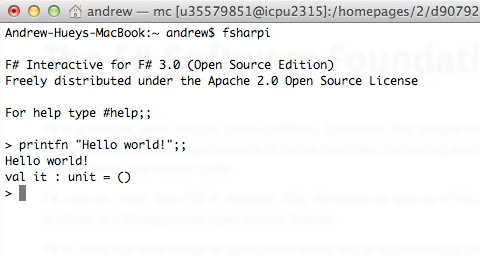
I’ve been messing around with F# lately. It works fine in VS 2013 Express on my Windows 8 laptop, but I wanted to be able to play around with it on my Mac too. I have Xamarin Studio installed on the Mac, and I added the F# support to it, and that works OK. I wanted to be able to use FSI from the terminal too, though. That turns out to be pretty easy too, though it’s called “fsharpi” instead of “fsi” like it is on the PC.

base 36 conversion

I haven’t posted any code on here in a while, so here’s a quick little bit of code that might be useful to somebody. I had to write some code this week to do conversion from base 10 to base 36 and back, in Dynamics AX. So I just took some simple code from the Wikipedia article on base 36 and converted it to X++. Nothing fancy. The code below is all in a job, but I’ll probably put it in a utility class when I actually implement it.

// https://gist.github.com/andyhuey/5c2404b65939b5fccab8
static void AjhBase36Test(Args _args)
{
    // ajh 2014-05-07: 611.23
    // adapted from http://en.wikipedia.org/wiki/Base_36.
    // note: handles non-negative integers only.
    #define.NBASE(36)
    #define.CLIST("0123456789ABCDEFGHIJKLMNOPQRSTUVWXYZ")

    int64 base36_decode(str base36_input)
    {
        int64 result = 0;
        real pow = 0;
        int i, pos;
        str c;

        for (i = strLen(base36_input); i > 0; i--)
        {
            c = subStr(base36_input, i, 1);
            pos = strScan(#CLIST, c, 1, #NBASE) - 1;
            if (pos == -1)
                return pos;  // error
            result += pos * power(#NBASE, pow);
            pow++;
        }
        return result;
    }
    str base36_encode(int64 input_num)
    {
        int64 work_num = input_num;
        str result = "";
        int digitidx;
        str c;

        do {
            digitidx = int642int(work_num mod #NBASE);
            c = subStr(#CLIST, digitidx + 1, 1);
            result += c;
            work_num = work_num div #NBASE;
        } while (work_num > 0);
        return strReverse(result);
    }

    print base36_decode("");
    print base36_decode("0");
    print base36_decode("A"); // 10
    print base36_decode("7PS"); // 10,000
    print base36_decode("255S"); // 100,000
    print base36_decode("!@#$"); // error
    print base36_encode(0);
    print base36_encode(123);
    print base36_encode(10000);
    print base36_encode(100000);
    pause;
}

more Project Euler stuff

This weekend’s main entertainment has been working on Project Euler problems. I’ve been trying to learn F#, so I decided to go back and re-do the first several Euler problems in F#. That exercise definitely helped me start to get a handle on doing things “the F# way”. I still have a long way to go, in terms of functional programming, but I’m learning.
I also solved problem 27, which was the next one up for me, in C#, as usual. Just because I wanted to make some progress, overall. This is only the second Euler problem I’ve solved this year, but I’m starting to get the “bug” again, so maybe I’ll knock a few more out this month.

checking user roles in AX 2012

It’s been a while since I’ve posted anything related to Dynamics AX / X++, so I thought I’d write up something I stumbled across recently. I had created a custom form, with a number of buttons on it. Two of the buttons needed to be available only to users in a certain role.

Well, first, I should point out that this can be done without any code. See here and here for information on that. And there are good reasons to do it this way, in many cases.

But there are also some good reasons to do this in code. It allows you to document what you’re doing and why, and it gives you more flexibility than just doing it through properties in the AOT. In my case, the business rules around this didn’t really fit into the permissions available in the AOT (Read, Update, Create, and Delete), so while I could have picked one of those and used it, it wouldn’t have accurately reflected the actual use case.

So I first wanted to find a method in X++ that would tell me if a given user was in a given role. I’m familiar with Roles.IsUserInRole from the .NET Framework, and have used it frequently in the context of ASP.NET sites using custom membership providers. So I looked for something similar in AX. That led me to the SysUserManagement Class.

I wound up writing a utility method that made use of this class:

// https://gist.github.com/andyhuey/9326912
/// <summary>
/// return true is the specified user is in any of the roles in the roleNames container.
/// </summary>
/// <param name="axUserId">
/// AX user id, e.g. curUserId()
/// </param>
/// <param name="roleNames">
/// container of role names to check. (use role NAME, not label.)
/// </param>
/// <returns>
/// true if user is in ANY of the specified roles.
/// </returns>
/// <remarks>
///
/// </remarks>

public static boolean isUserInRole(UserId axUserId, container roleNames)
{
    SysUserManagement userManagement = new SysUserManagement();
    List roleList = userManagement.getRolesForUser(axUserId);
    ListEnumerator listEnum = null;
    boolean isInRole = false;
    str roleStr = '';

    if (!roleList)
        return false;

    listEnum = roleList.getEnumerator();
    while (listEnum.moveNext())
    {
        if (conFind(roleNames, listEnum.current()))
            return true;
    }

    return false;
}

It worked fine on my VM, when logged in under my own ID. But, after deployment, it quickly became apparent that X++ code running under a normal user account (without SYSADMIN rights) can’t call methods in the SysUserManagement class. Now, there’s nothing I can see in the documentation that indicates that, but I should of course have tested my code under a normal user account.

So I rewrote my code to access the appropriate role-related tables directly, and it turns out that a normal user can do that, no problem:

// https://gist.github.com/andyhuey/9326939
/// <summary>
/// return true is the specified user is in any of the roles in the roleNames container.
/// </summary>
/// <param name="axUserId">
/// AX user id, e.g. curUserId()
/// </param>
/// <param name="roleNames">
/// container of role names to check. (use role NAME, not label.)
/// </param>
/// <returns>
/// true if user is in ANY of the specified roles.
/// </returns>
/// <remarks>
/// ajh 2014-02-12: previous method req'd admin perm. to run. Doh!
/// </remarks>

public static boolean isUserInRole(UserId axUserId, container roleNames)
{
    SecurityUserRole securityUserRole;
    SecurityRole securityRole;

    while select AotName from securityRole
    join securityUserRole
    where securityUserRole.User == axUserId
    && securityUserRole.SecurityRole == securityRole.RecId
    {
        if (conFind(roleNames, securityRole.AotName))
            return true;
    }
    return false;
}

So I guess the lesson here is to always test your code under a normal user account, and not to assume that the MSDN page for a given AX class will tell you everything you need to know about that class.

And, as with a lot of stuff in AX, I have a feeling that I’m still doing this “the wrong way”, even though my code works and is fairly simple. I’m guessing that, a year from now, I’ll have figured out that there’s a better way to do this.

Automation

I don’t think I’ve ever linked to an XKCD comic on this blog before, but (of course) I read it regularly. This one made me chuckle, thinking about a project I’m currently working on. I have a task that involves generating output files and sending them to a few other companies via SFTP, weekly. For “phase one,” I was going to manually run my program to generate the files, then send them out with WinSCP. Then, once that was running smoothly, I was going to add SFTP capability to the program, using SSH.NET.
This is kind of a long story, but to make it short, let’s just say that I’ve spent more time than is really reasonable taking care of the SFTP automation, and have yet to put it into production. Meanwhile, I just keep sending out the files every week, manually.
I’ve actually learned a lot about a couple of things in the process of working on this automation, but the amount of effort that’s gone into the automation, vs. the five minutes it takes to send the files off manually once a week is a bit silly.