Apple TV

I got an Apple TV today. I got it largely so I can watch Battlestar Galactica, season 4, in HD. And so I can watch Torchwood, season 2, which I downloaded back in July but haven’t gotten around to watching yet.

It was relatively easy to set up, but I’ve hit a few snags. The biggest one involves syncing my videos from my PC to the Apple TV. I fully expected that an initial sync between the PC and the Apple TV would take a long time. However, I didn’t expect that the sync would hit some kind of snag and abort after 5 minutes, every time I try to run it. Looking at the forums at Apple’s web site, it seems like this is a fairly common problem. Reading through a few threads, it seems like the only foolproof way to do an initial sync is to use an Ethernet cable. Unfortunately, I don’t have an Ethernet cable long enough to reach from my router to my TV here in the apartment. I’ll have to borrow one from work tomorrow. I think that this is a pretty big problem — syncing with a PC is pretty fundamental to the operation of this thing, and it should really be able to do it wirelessly. I don’t need it to happen fast, but it should *happen*. I can download pretty big files to my PS3 and my Tivo over the wireless network, no problem, so I know it’s not a problem with my network.

iTunes 8, continued

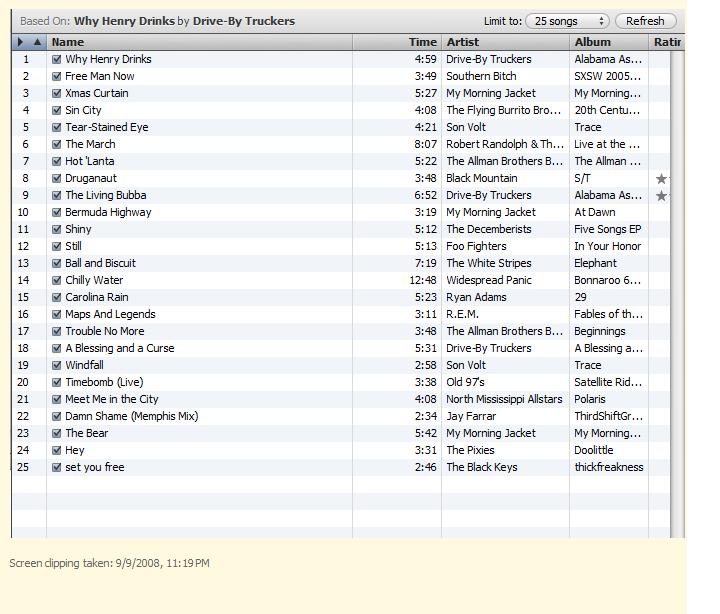
Well, my desktop Vista machine finally finished chugging through its “Genius” stuff. Just for yuks, I hit the Genius button on “Why Henry Drinks”, by Drive-By Truckers, and iTunes gave me a pretty awesome playlist, which I’d like to paste here, but I’m having trouble exporting the playlist to a format that I can easily paste into Blogger’s editor. The best I can do right now is a screenshot:

iTunes 8

I’ve upgraded all of my home computers to iTunes 8 today. My desktop Vista machine is still running through the “Genius” setup, which apparently takes a long time when you run it on a large library. My one pet peeve with iTunes 8 is that there is no longer a preference pane setting to turn off the Genre column in the browser. It can still be turned off though, using this hint. That worked fine on the Mac, but I’m not sure how to translate that to the PC. It’s probably a registry setting or something. I’ll have to play around with it later.

Meanwhile, I can’t seem to download app updates for my iPod Touch from iTunes right now. I’m hoping that’s a temporary glitch related to the iTunes 8 rollout. I’ve got two apps that need to be updated. I’ll have to take a look at that again tomorrow.

One more Apple-related note: I ordered a refurbished Apple TV unit today. I was motivated by the availability of Battlestar Galactica in HD on the iTunes store. I never got around to watching any of BSG season 4 off my Tivo, and now the first few episodes have disappeared. (Apparently, I ran out of room at some point, and they were dropped.) The quality on my Tivo Series 2 isn’t great anyway. I don’t mind paying $30 or so to get the whole season in HD, and without commercials or those annoying crawls for Ghost Hunters or whatever else SciFi is plugging. Oh, and with the Apple TV, I’ll finally be able to watch Torchwood season 2 on my TV. I downloaded that from iTunes while I was in San Diego, and I watched the first episode on my laptop, but I haven’t gotten around to watching any more of them.

iPhone note-taking apps

There are a couple of new note-taking apps for the iPhone that came out just recently. MagicPad’s key feature is cut and paste, which, sadly isn’t built into the iPhone system software. iNote is fairly straightforward and simple. One interesting feature is the ability to switch to landscape mode, which isn’t present in the built-in notepad app. Sadly, neither of these apps has the capability to sync to the desktop or to the web in any way.

iPod Touch annoyances

The MobileMe syncing stuff has been working fine for my calendar and contacts. I mentioned previously that there was one annoyance with this — there’s no way to get the birthday calendar down to the iPod Touch. I’ve now gotten around this by turning off the normal birthday calendar in iCal, and instead using the ability of MenuCalendarClock to copy birthdays from Address Book into a “normal” iCal calendar. So, long story short, I’ve got all my birthdays on the iPod Touch. MenuCalendarClock costs $20 to register, which is pretty reasonable, given that it does a few other useful things.

I still haven’t found a good note-taking app that syncs between the Touch and either my Mac, PC, or the web. I’m going to keep an eye on the app store and see if anything new and interesting appears.

more iPod Touch and MobileMe stuff

I see that Apple is extending all MobileMe subscriptions by 30 days to make up for the hiccups in the first few days of the service. That’s nice of them. MobileMe is working OK for me now. I’ve input stuff on the web, on my Mac, and on my iPod, and the sync is working fine no matter where I enter stuff. I’d still like to get the birthday issue straightened out though.

When I set up the 2.0 software on my iPod, I initially turned on “push”. That works well, but really drains the battery. I’ve got “pull” turned on now instead, and I’ve got the thing configured to check once an hour. I hope that’ll clear up the battery issues. I wonder if they could make the pull functionality work a bit more intelligently, so it doesn’t kill battery life.

I’ve looked around at a number of productivity apps for the iPhone / iPod Touch. I haven’t found one that looks like it’s all the way there yet, for what I need. There are a few interesting apps that don’t actually sync with their desktop counterparts yet. Things is a good example. Ditto for Dejumble.

I think my preference right now would be to have an iPhone version of DevonThink, Backpack, or maybe Yojimbo. With full sync, of course. I’m not sure any of these apps are going to get iPhone versions soon, though.

MobileMe

I’ve updated my iPod Touch with the 2.0 software, and done the necessary updates on my Mac to support the new MobileMe syncing stuff. Apple is *almost* where they need to be to allow me to replace my old Palm with the iPod Touch. I now have my calendar and contacts synced automatically to the Touch, accessible on the web, and on my Mac. And I can update either the calendar or contacts on the Touch, Mac, or web, and it should all sync automatically. Pretty cool!

There are couple of little problems. First, while the birthdays from my contacts can show through to my calendar on the Mac and on the web, they don’t show on the iPod Touch. This problem is described here, and there’s a tech note about it here. That’s not a killer problem, but it’s definitely an annoyance.

The other problem is that there’s still no good way to sync text notes in the same way as the contacts and calendar. There are a couple of third-party solutions that may work out for this. Here’s an interesting one that should be available soon. Evernote is available now, and might be what I’m looking for. It would be nice if 37 Signals came up with something to allow you to sync BackPack to the iPhone/Touch for offline access, but I don’t see any indication that they’re working on that.

MacHeist and other Mac stuff

Well, after deciding not to buy this year’s MacHeist, I changed my mind and gave them my $49 today. They’ve added enough stuff to the bundle to make it worthwhile for me. Even if I don’t use anything else I’ll probably get my money’s worth out of the two games they added.

And I gave Apple $20 for the new iPod Touch apps. The Touch still isn’t where I think it should be, in terms of functionality, but I’m hoping third-party software will fill the remaining holes after the API comes out next month. If I could just get contact, calendar, and note-taking apps that all sync back to my computer, and can be updated on either the Touch or the MacBook, I’ll be happy. I’m basically just looking for the same stuff I’ve got on my Palm.

Mac software

MacHeist has another bundle of Mac software on sale right now. It’s a good deal, if you need more than one or two of the included applications. I bought the bundle that they were selling about a year ago. About the only app from that bundle that I’m using regularly is DevonThink, which is pretty useful. I’m not really seeing anything in the current bundle that I’d be likely to use, though, so I guess I’ll skip this one.

I have pretty much everything working the way I want it on my new MacBook now. I’ve got FolderShare working fine now. I’ve replaced MacStumbler, which doesn’t seem to work on Intel Macs, with iStumbler, which works fine. And I found out that my old version of the Transmission BitTorrent client didn’t work, so I upgraded to the newest version, which is working fine.

Office 2008 looks interesting, but I don’t think I’ll bother with it. I hardly ever do any word processing or spreadsheet work on the Mac. I do all of that stuff on the PC.

I also paid for VMWare Fusion a couple of weeks ago. (I’d been using the trial version.) I’ve got a Windows XP virtual machine set up, and it’s working reasonably well. I’m mostly just using it when I need remote access to some stuff at work. (I still use pcAnywhere for that, most of the time.)