Pope Francis Names Joseph Tobin to Lead Archdiocese of Newark

From the NY Times:

Francis’ pick is Joseph W. Tobin, currently the archbishop of Indianapolis. He made national headlines last year when he rebuffed Gov. Mike Pence of Indiana, now the Republican vice-presidential nominee, by refusing to stop Catholic Charities from resettling a family of Syrian refugees.

And:

Archbishop Tobin [..] is replacing Archbishop John J. Myers, a conservative who is among a small minority of American prelates who announced long ago that Catholic politicians who support abortion rights should not receive Holy Communion.

Also:

Myers’s tenure was hobbled in recent years after he failed to ensure that a priest convicted of child sexual abuse no longer had access to children.

Myers is the guy who spent half a million dollars of church money on upgrades to his retirement home.

I have a lot of snarky comments in my head about all this upheaval in the church, but I’m going to withhold them all and just say that I’m following Francis’ reforms with some interest and lots of hope.

Doctor Strange

One of the nice things that usually happens whenever Marvel or DC release a new superhero movie is that they reprint some old comics featuring that particular hero. Also, Comixology generally runs a sale discounting some old books featuring that hero. I’m a fan of Doctor Strange, so I’ve been keeping an eye on this.

Marvel has recently released a gigantic Doctor Strange Omnibus: impressive, but expensive. It’s a hardcover reprint of the original Lee/Ditko run. Then there’s a new Doctor Strange Epic Collection. This volume collects some of the comics from the late sixties and early seventies, including work by Barry Windsor-Smith. I haven’t bought either of these, but I might pick up the Epic Collection.

The book I’m most excited about, though, is a new collection of P. Craig Russell’s Doctor Strange work, Dr. Strange: What Is It That Disturbs You, Stephen?. Russell has long been my favorite comic book artist. This book includes the 1996 one-shot that shares the same unwieldy title as this collection. I think I still have a copy of it, but it’s nice to have it in a collection too. It’s a really good story with great art by Russell. It also includes Russell’s 1976 Doctor Strange Annual, which I used to have a copy of, but probably donated when I was getting rid of most of my collection. The 1996 story is basically a reworked version of the 1976 Annual, but really it’s a whole different thing. It started out, I think, as a project to reprint the Annual with some additional pages, but it wound up being a whole new story with completely new art and a new script. So both stories are interesting to read. The rest of the book reprints a hodgepodge of stories that were either penciled or inked by Russell. They’re a mixed bag, but a few of them are interesting, including one with art by Russell and Marshall Rogers, one of my other favorite artists. I bought this book at my local comic shop, for the full $30 cover price, as soon as I saw it. (It turns out that I could have gotten the Comixology version for only $15, but it’s nice to have the hard-copy version.)

Meanwhile, Comixology is running two Doctor Strange sales this weekend, one on single issues and one on collections. I’ll probably pick up two or three of the collections that I don’t already have.

Oh, and hey, the movie seems to be doing well on Rotten Tomatoes, so I should probably go see it. Maybe tomorrow, if I can talk myself into leaving the apartment.


Cable TV shenanigans

About a month ago, I blogged about how my cable TV provider was discontinuing my old plan and moving me to a new one. That’s happened, so I now have BBC America, Disney XD, and a few other channels that I’ll probably never watch. For the first year of the new plan, it should have been slightly cheaper than my old plan, so I was OK with that.

For a while now, Cablevision has been tacking on a “surcharge” of $6 per month for “sports and broadcast TV.” This is basically just a way for them to raise prices without saying that they’re raising prices. Well, this month, they announced that they’re splitting the surcharge into two separate surcharges, a $5 sports surcharge, and a $4 broadcast TV surcharge. As silly as the original surcharge was, splitting it into two separate charges is even sillier. And, while it’s not a huge price increase, it does wipe out the price difference between my old plan and the new plan, so I’m now paying about $1 more per month than I was previously.

Ever since Altice bought Cablevision, I’ve been wondering what kind of changes they’d make. It looks like they’re taking the path of eliminating legacy plans and bumping up prices a bit, while taking some steps to avoid losing customers (like the promotional pricing they gave me for the first year). So, I’d say they’re still better than most of the other cable companies out there, but that’s not saying much. Cable TV prices keep rising at a rate higher than inflation, and I don’t think that situation is going to get any better, as the industry continues to consolidate into a few very large companies.

This is all pushing me even further towards cord-cutting, though I’ve decided that I won’t do that until at least a year from now, when my second year of TiVo service is up, and my promotional pricing from the cable company expires. The NY Times recently published an interesting guide to cord-cutting, with advice based on your viewing habits.

On the cable TV side of things, I think that cord-cutting will, at some point, exert enough pressure to keep prices in check. Even without that pressure, TV service isn’t a necessity, so there’s that. I’m worried about the internet service side of this thing though. High-speed internet service is becoming more of a necessity, especially for people like me. The tendency for prices to go up while service quality goes down, when one company has a monopoly in a given area, is well-documented. For now, I’m quite grateful that I live in an area where Cablevision/Altice has to compete with Verizon, so there’s at least some incentive for both companies to provide good service at a not-too-ridiculous price.

LastPass and 1Password

LastPass just recently made their sync feature available in their free product. Previously, it was only available in their $12/year premium product. So, if that was the only thing holding you back from using a good password management program, go ahead and give LastPass a try.

I’m using 1Password, and I’m still quite happy with it. I bought it back when it was sold as a software product rather than a service. So I paid for the Mac, Windows, and iOS apps, and I sync my passwords via DropBox. AgileBits has been good about continuing to support their “legacy” customers, and not trying to force everyone onto a subscription plan. (I think they learned a bit from TextExpander’s stumbles in this area, and have succeeded in not alienating their long-time customers.)

I was thinking recently about what I would miss if I gave up my MacBook and switched entirely to Windows. One of the things at the top of my list was the 1Password Mac application. They do have a Windows application, but it’s not great. Any time I know that I need to do any non-trivial organization of my password database, I always fire up my MacBook. I only do minor edits on the PC. Thinking about that got me curious as to whether or not AgileBits was working on a new Windows app. It turns out that they were, and they’ve released it, but only for their “team” service. It sounds like they’re going to release it for non-subscription customers at some point, but they haven’t committed to a date for it yet. So I’m looking forward to that.

I’m not actually opposed to paying 1Password $3/month for their paid individual plan, though that does seem a little steep to me. (I think LastPass has it right at $12/year. Of course, their apps probably aren’t as good as 1Password.)

By the way, if you happen to be in the market for a paid LastPass subscription, Humble currently has a software bundle running that includes a one-year LastPass Premium subscription (for new customers only).

Instapaper Premium is now free

It was announced yesterday that Instapaper Premium is now free. I’d been paying the old rate of $12/year for it, so it’s no big deal for me. I’m not sure what the current rate was, but I don’t think it was that expensive.

When Pinterest bought Instapaper a few months ago, I wondered what they’d choose to do with it. Discontinuing their only source of direct revenue from the product is an interesting decision. I thought that maybe part of this would be eliminating the ad-free option, but their blog post makes it clear that they’ll now be ad-free for everyone.

My first thought when I read an announcement like this is the old saying “if you’re not paying for the product, you’re the product.” That does seem to be at least partially the case here, as someone from Instapaper pointed out in this Hacker News thread:

Pinterest receives value from the ongoing operation of Instapaper in the form of continued parsing improvements and aggregate information about links on the web, and that value is enough to justify our relatively small operating costs.

So, basically, it sounds like Pinterest uses the Instapaper parsing engine for other stuff, and gets value out of the aggregate data produced from Instapaper’s continued operation. So making the premium product free gets more people to use the service, giving them more data to work with. I guess that’s a win/win, if it’s entirely true, since it lets me keep using a valuable service, for free. And it doesn’t sound like they’re selling customer information to anyone else, or doing anything shady with it.

Despite all the usual snarkiness in that Hacker News thread, I think Instapaper is still a great product, and I hope it sticks around and continues to improve. Thinking about the costs associated with something like Instapaper, I can see how it could be sustainable with a fairly low budget. They only really need to store simple text and metadata, not images or video, so their storage costs can’t be that bad. And, for ongoing development, I think they probably just need to keep tweaking their parser to keep up with the web as it evolves. The basic products (web site and mobile apps) aren’t flashy and probably don’t need much ongoing work.

AD&D games and Doctor Who audio

I’ve blogged about AD&D gold box games a couple of times in the past. I finally got around to buying a bunch of them from GOG last week, when they had some game bundles on sale for 50% off. So I only spent $10 and got about a dozen games.

The last thing I bought from GOG was Neverwinter Nights, which I started playing over this summer, but got sidetracked from at some point. I haven’t played it in more than a month (though I do really want to get back to it).

So I’m probably not going to actually play any of those gold box games any time soon. But that’s OK. They’re DRM-free and multi-platform, so they’ll be there whenever I get around to it. And they include PDF files of all the cool extras that came with these games, so I’ll have some fun browsing through them at some point. It’ll bring back some fun memories.

I’ve also recently started listening to Big Finish’s Doctor Who audio dramas again. I hadn’t really listened to any of them at all this year, so it’s fun to get back into those. I’ve still got 4 or 5 of them that I haven’t listened to yet, so I’m in no danger of running out. But they had a Halloween sale this weekend, so I went ahead and bought one more: a box set of Fourth Doctor “lost stories.” I haven’t listened to any of Big Finish’s Tom Baker stuff at all, so I’m looking forward to that.

So I’ve got plenty of nerdy entertainment options to get me through the fall and winter!

Mac Sierra Accessibility Tip – Zooming

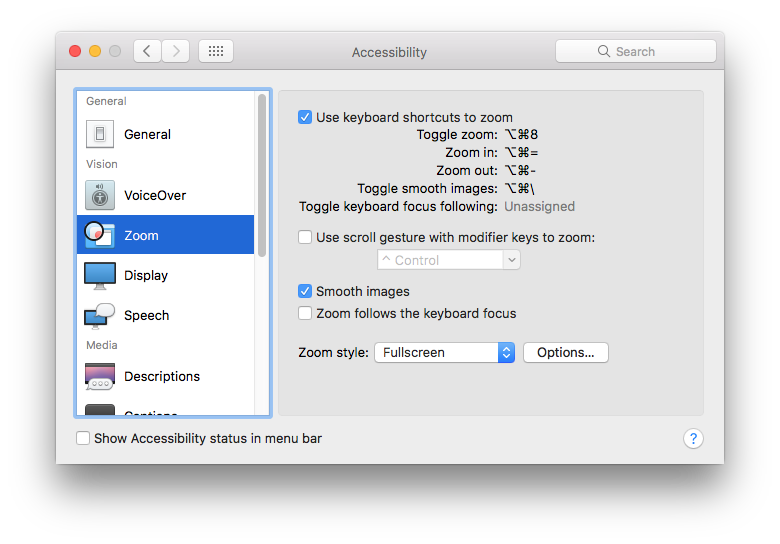
Here’s a quick accessibility tip for macOS Sierra: If you rely on the “zoom” function as much as I do, you might notice that it doesn’t seem to work as well after upgrading to Sierra. Everything looks blurry when you zoom. The issue is just that the Sierra upgrade, for some reason, turns off the “smooth images” option. Turning it back on gets things back where they should be. (I’m not sure if the Sierra upgrade always does this, or if it was a fluke. But it definitely did it in my case.)

And if you’re not familiar with the zoom function: it’s great. Better than anything I’ve tried on a Windows PC. It’s one of the main reasons why I still like my MacBook and macOS. Despite all of the silly changes they’ve made over the years, which I won’t get into right now, as I don’t want to go off on a tangent… Anyway, you can find it in the “accessibility” options, along with some other cool stuff.

On Windows, the built-in screen magnifier is ok, but really not that useful for me. Mark Russinovich’s ZoomIt is pretty good, but it’s more of a presentation tool than an accessibility tool.

accessibility options

Veep Head Writer David Mandel Builds a Private Museum

Mr. Mandel […] now has two homes in Los Angeles: one where he lives with his wife and two children; and another, his former bachelor’s apartment, that houses his extensive collection of comic-book and “Star Wars” memorabilia.

Source: The ‘Veep’ Head Writer David Mandel Builds a Private Museum – The New York Times

I read this article, and now I’m super-jealous of this guy. He has the best of both worlds: a nice house, with a wife and kids, and a spare apartment on the side, filled with comic books and toys! Meanwhile, I’ve still got just the apartment: no house, no wife, no kids. And I donated most of my comics to charity, so I don’t even have them to keep me warm at night.

I’m also jealous of his original art collection, which he started putting together in the 90s, at San Diego cons, when prices were (relatively) low. I, too, spent some time at those cons, but, for me, original art was always outside my budget. He was writing for Seinfeld at the time, so his budget at SDCC was likely a bit larger than mine. He talks about spending $5000 at the show on art; my budget for a given con was never more than $500. (I usually came home with a big bag full of discount trade paperbacks and random single issues out of the dollar bins.) Of course, if I knew how much some of that art would appreciate in value, I would have taken a loan against my 401(k) and bought a bunch of it. I’d be selling it about now, and taking early retirement.

I get a kick out of the fact that this was published in the “Men’s Style” section of the Times. (Not a section I would normally read; it only surfaced for me due to my keyword search on “comics.”) I’m not sure when having a spare apartment full of comics and toys went from “disreputable eccentricity” to “admirable lifestyle choice,” but I’m glad it did.

The cost of a good education

After wringing my hands recently about the cost of a Pluralsight subscription ($300/year), I came across this article about the cost of a master’s degree in computer science. Georgia Tech is currently offering an online master’s in CS for only $7000, which is apparently astonishingly inexpensive. As the article points out, a master’s in CS from USC would cost $57,000. (I just went back and reread the article, and realized that they never mention how much an on-campus degree from Georgia Tech would cost. I’m guessing it’s much less than USC’s cost, so it would have made a less startling contrast. But it would have been a more relevant comparison. Oh well.) Anyway, I guess I shouldn’t complain about the cost of the kind of “continuing professional education” that you get from a service like Pluralsight, when you compare it to an actual college education.

Over the years, I’ve occasionally thought about going back to college and getting my master’s degree. In the past, before online education took off, I considered doing it part-time, locally, at maybe someplace like Rutgers, NYU, NJIT, or Stevens. I could never quite talk myself into it, due to the cost and amount of work that would be required. If this Georgia Tech program had been available ten or twenty years ago, I might have considered doing it, part-time, over several years. Now, I don’t think I’d ever be able to do it while also holding down a full-time job. I just don’t have the energy to spend a couple of hours on the computer every night, programming and reading books and watching lectures, after a full day of work. (And, at this stage of my life & career, I’m not really interested anyway.)

Meanwhile, I’ve been bookmarking even more Pluralsight videos that I want to watch. And I keep seeing interesting stuff in the EdX and Coursera emails that I get every week. Maybe I’ll manage to pick up on some of that stuff soon. There’s so much new stuff I want to learn!

Pluralsight and SharePoint

I recently started working on a new SharePoint project at work. This project is basically replacing an old SharePoint 2003 solution with a new SharePoint 2013 one, making a number of improvements along the way. The requirements for this project are a bit beyond my current level of expertise with SharePoint. (Which is a fancy way of saying that I don’t know what the hell I’m doing on this.)

When I last worked on a major SharePoint project, I’d bought a few books on SharePoint 2010 and 2013, and read through them. (Or at least the parts that were relevant to that project.) That was more than a year ago, though, and I’m pretty rusty now. And the new project is a lot more complex than that previous one. So I went back and reread some sections of those books, and did some typical internet research, and stuff like that.

I also remembered that Andrew Connell had a series of videos available on Pluralsight covering SharePoint 2013 development, and that you can get a 3-month Pluralsight trial account through the Visual Studio Dev Essentials program. So now I’ve got a free Pluralsight account that will last me through to the end of the year, and I’ve been watching the Andrew Connell videos in my spare time. When I’m through with those, Sahil Malik has a bunch of SharePoint 2013 videos on Pluralsight too.

I’ve been watching the SharePoint videos on my desktop PC at work, but Pluralsight also has iOS apps, including one for the Apple TV. So I need to download that, and see if the developer training videos are at all effective when watched on a regular TV, from my couch. (I was going to do that on Sunday, but my migraine intervened.)

I’ve thought about paying for a Pluralsight subscription occasionally in the past, but I’ve always decided against it, due to the cost: $300/year or $30/month. So, a good bit more expensive than Netflix, though maybe that’s not a fair comparison. There’s a lot of other stuff on Pluralsight that I’d love to watch, but it’s so hard to find the time to start learning anything new. So I don’t know know if I’d really get my money’s worth out of the subscription. Maybe if I could talk myself into watching Pluralsight videos instead of NCIS reruns once in a while, I could finally learn AngularJS.