Cool, a new Bob Mould song!
Author: Andrew Huey
InstaCast
After my issue with podcasts that I posted about last week, I decided to switch from using iTunes and the Apple podcast app to Instacast. I bought both the Mac and iOS versions. After using both for about a week, I’m mostly satisfied, but there are definitely a few shortcomings.
First, on the plus side, Instacast hasn’t arbitrarily deleted a bunch of podcasts from my Mac, as iTunes did last week. Instacast has a pretty interesting way of dealing with podcast files, actually. It’s not quite perfect for the way I’d like to do it, but it’s reasonable. Basically, you set a maximum amount of space that you’d like to use for podcasts, and Instacast deletes stuff once it reaches that limit. It’s pretty sensible about picking what to delete — it goes for episodes that you’ve already played and haven’t marked as favorites first, if I understand it correctly. I’ve set it to use up to 10 GB on my Mac, and 1 GB on my iPhone, so that should be good enough. I kind of wish, though, that you could set certain podcasts to keep forever. There are a few podcasts, like Warren Ellis’ SPEKTRMODULE, for instance, that I’d like to just keep forever. With Instacast, I can’t really do that, and I guess I’d want to copy the files out of Instacast and into a separate folder.
Which brings up a separate point: Instacast does allow you to right-click on a given podcast episode and select “Show in Finder”, so that’s good. But, unlike iTunes, it doesn’t organize individual podcasts into their own folders, now does it keep the original file names. Instead, it puts all of its files together in a single folder, and names them with (I assume) random GUIDs. So, to copy out all of the episodes of a given podcast, I’d really have to do “show in finder” on each one individually, and copy them one at a time. (And if I wanted the copied files to have reasonable names, I’d have to rename them too.) So I’m not too happy about that, but it’s not a terribly big deal.
In terms of the actual functionality of the apps, let’s start with the Mac app. It seems to be a reasonably well-written Mac app, not taking up too much memory or CPU, and launching pretty quickly. (I wish that was something I could take for granted with a commercial Mac app, but alas, no…) I’m using the Mac app mostly to watch Tekzilla. (If there were any other video podcasts that I was interested in, I’d use it for those too, but there isn’t anything else I’m following right now.) It does a good enough job on that. Basically, it just plays the video and gets out of the way, which is what I want. It works fine for playing downloaded episodes, and it can also stream episodes that you haven’t downloaded, which is nice.
For the iOS app, that also works reasonably well. I use it only for audio podcasts, and I follow a few of those. You can set it to download episodes only when on wifi, which is a good thing, as my Verizon data usage has been a problem lately. I’ve had it randomly stop playing a podcast twice so far, which is a bit puzzling. In both cases, I could start the podcast back up where I left off, no problem. I was driving both times, so I didn’t see what happened. I’m not sure if the app crashed or if it just stopped playing. And I think it was the same podcast file both times, so maybe there was just something wrong with that file. If this keeps happening, I’m going to get frustrated with it pretty quickly, but we’ll see what happens over time.
There’s a function built into both the Mac and iOS apps called “Up Next” that lets you create an on-the-fly playlist of a few random podcast episodes, so you can set yourself up if you’ve got a long drive. I used it today for my 90-minute drive down to a friend’s house, and it worked well. There doesn’t seem to be a way, though, to tell it to just continuously play consecutive episodes of a single podcast, which is a bit weird.
There are a few other things I could mention, but this post is long enough as-is, so I’ll leave it there, and just say that I don’t regret spending the $20 on the Mac app and $4 on the iOS app, but I’m still not sure if I’ll stick with it or switch to something else in the long term.
iBooks on the Mac
I have a few things I want to write up and post today, and, taken together, I think they’re going to make me look like a cranky old man. But that’s ok.
I bought a couple of Microsoft Press ebooks from O’Reilly today, since they’re having a “Farewell MS Press” 60% off sale right now, so I thought I’d snag a couple while they were cheap and still DRM-free. It looks like MS Press is moving to Pearson for distribution, starting April 1. It’s unclear as to whether or not they’ll continue to offer DRM-free ebooks, but (being a pessimistic and cranky old man), I’m guessing no.
So, after downloading them, I wanted to drag them into iTunes so I could read them on my iPad with iBooks. (That’s a lot of iProducts, huh?) Well, I hadn’t done that in a while, so, for some reason, I launched iBooks on my Mac. I don’t think I’d ever actually done that before, as I don’t really read books on the MacBook. It prompted me to import my books from iTunes, so I went ahead and did that. Now I’m cranky.
Having a dedicated app to read books on the Mac seems like a good idea. There’s no particularly good reason books should be kept in iTunes. But, after going through that import process, I’m not entirely happy with the result. iTunes kept books in a nicely-organized folder, with sub-folders by author name, and files named (sensibly) according to the book title. And (of course) if you pulled in a book with bad metadata, you could press Command-I on it in iTunes and edit the metadata.
iBooks, on the other hand, stores all the books in one folder, no sub-folders, with names that appear to be randomly-assigned GUIDs. And there’s no right-clck “View in Finder” option in iBooks, so there’s really no telling which one is which. And there’s no way to edit metadata in iBooks, so if you import a book with bad metadata, it’s quite a task to change it. (There’s some more help with that here.) Or I could switch back to iTunes, but that’s pretty darn complicated.
I’m starting to wonder if I should switch to a third-party reader app (much as I did with podcasts last week) and give up on iTunes. Almost all of the ebooks I want access to on my iPad are DRM-free ones from O’Reilly and Packt. I already have a few apps on my iPad that might do the trick, including GoodReader, the Kindle app, and OverDrive. Maybe I need to pick one that works well with DRM-free epubs or mobi files, and stick with it.
Google+ surprise
So I got a little surprise today when I got a notification on my phone that someone had commented on my Google+ post. Now, I haven’t even *looked* at Google+ in months, so I wasn’t sure what had happened there. It turns out that Google has been helpfully sending all these blog posts to Google+. I’m sure I must have clicked “OK” on a dialog that popped up on the Blogger site at some point to allow that, but I’ll be darned if I can remember doing so.
It doesn’t really bother me that this is happening, but it’s one more little thing that makes me revisit the idea of moving this blog to Drupal or WordPress, hosted on my 1&1 account, and administered entirely by me. I have quite a few posts on this blog, so I would of course want to import them to any new blog, and there’s the rub. Some time ago, I tried to import everything to a new Drupal site, using this importer. To make a long story short, it didn’t work. (That may not have been entirely the fault of the importer; it might have been something with my local MySQL and/or PHP setup.) But now I’m thinking, more and more, that I don’t want to trust Google too much. With the direction they’ve been going in lately, I could see them, at some point, trying to fold Blogger into Google+, and I *really* don’t want that!
speed

I’ve been wondering lately if I should upgrade to the faster version of my cable internet service (“Optimum Online Ultra 50”) that costs an extra five bucks a month. So I’m posting my current speed here for later reference. 
disappearing podcasts
I wanted to watch a little Tekzilla this morning, and was surprised to find Tekzila had completely disappeared from my iTunes library. Then, I noticed that about half the podcasts I download are completely missing from iTunes. Some of them are video podcasts, and some are audio. Some are podcasts that I sync to my iPhone, and some aren’t. No particular pattern.
The ones that I sync to my iPhone are still on the iPhone, but not on my Mac. And there doesn’t seem to be any way to get them back up to the Mac. They’re not in the file system, but just missing from iTunes. And they’re not in the trash. They’re just all gone.
I’ve looked around Apple’s support forums, and I’ve seen that a lot of people have had similar problems, but I haven’t found any solution that really matches my particular problem. I’m pretty sure that, at this point, I’m going to have to re-download all the podcast episodes that I haven’t listened to yet, so that’s a pain, but I really don’t know if the problem is going to recur, or if this was just a one-time thing.
I’m so annoyed with this now that I want to switch to a different podcast client, but I’m not sure if there’s a good one that actually does what I want it to — download on the Mac, and sync selected stuff to the phone. I’m looking at Downcast and Instacast right now. I’ll probably post a follow-up on this at some point, when I figure out what I’m doing.
checking user roles in AX 2012
It’s been a while since I’ve posted anything related to Dynamics AX / X++, so I thought I’d write up something I stumbled across recently. I had created a custom form, with a number of buttons on it. Two of the buttons needed to be available only to users in a certain role.
Well, first, I should point out that this can be done without any code. See here and here for information on that. And there are good reasons to do it this way, in many cases.
But there are also some good reasons to do this in code. It allows you to document what you’re doing and why, and it gives you more flexibility than just doing it through properties in the AOT. In my case, the business rules around this didn’t really fit into the permissions available in the AOT (Read, Update, Create, and Delete), so while I could have picked one of those and used it, it wouldn’t have accurately reflected the actual use case.
So I first wanted to find a method in X++ that would tell me if a given user was in a given role. I’m familiar with Roles.IsUserInRole from the .NET Framework, and have used it frequently in the context of ASP.NET sites using custom membership providers. So I looked for something similar in AX. That led me to the SysUserManagement Class.
I wound up writing a utility method that made use of this class:
// https://gist.github.com/andyhuey/9326912
/// <summary>
/// return true is the specified user is in any of the roles in the roleNames container.
/// </summary>
/// <param name="axUserId">
/// AX user id, e.g. curUserId()
/// </param>
/// <param name="roleNames">
/// container of role names to check. (use role NAME, not label.)
/// </param>
/// <returns>
/// true if user is in ANY of the specified roles.
/// </returns>
/// <remarks>
///
/// </remarks>

public static boolean isUserInRole(UserId axUserId, container roleNames)
{
    SysUserManagement userManagement = new SysUserManagement();
    List roleList = userManagement.getRolesForUser(axUserId);
    ListEnumerator listEnum = null;
    boolean isInRole = false;
    str roleStr = '';

    if (!roleList)
        return false;

    listEnum = roleList.getEnumerator();
    while (listEnum.moveNext())
    {
        if (conFind(roleNames, listEnum.current()))
            return true;
    }

    return false;
}
It worked fine on my VM, when logged in under my own ID. But, after deployment, it quickly became apparent that X++ code running under a normal user account (without SYSADMIN rights) can’t call methods in the SysUserManagement class. Now, there’s nothing I can see in the documentation that indicates that, but I should of course have tested my code under a normal user account.
So I rewrote my code to access the appropriate role-related tables directly, and it turns out that a normal user can do that, no problem:
// https://gist.github.com/andyhuey/9326939
/// <summary>
/// return true is the specified user is in any of the roles in the roleNames container.
/// </summary>
/// <param name="axUserId">
/// AX user id, e.g. curUserId()
/// </param>
/// <param name="roleNames">
/// container of role names to check. (use role NAME, not label.)
/// </param>
/// <returns>
/// true if user is in ANY of the specified roles.
/// </returns>
/// <remarks>
/// ajh 2014-02-12: previous method req'd admin perm. to run. Doh!
/// </remarks>

public static boolean isUserInRole(UserId axUserId, container roleNames)
{
    SecurityUserRole securityUserRole;
    SecurityRole securityRole;

    while select AotName from securityRole
    join securityUserRole
    where securityUserRole.User == axUserId
    && securityUserRole.SecurityRole == securityRole.RecId
    {
        if (conFind(roleNames, securityRole.AotName))
            return true;
    }
    return false;
}
So I guess the lesson here is to always test your code under a normal user account, and not to assume that the MSDN page for a given AX class will tell you everything you need to know about that class.
And, as with a lot of stuff in AX, I have a feeling that I’m still doing this “the wrong way”, even though my code works and is fairly simple. I’m guessing that, a year from now, I’ll have figured out that there’s a better way to do this.
Motion Sickness of Time Travel
I really like this. Makes for good background music, while reading a scary book!
Anime watching
It’s been so cold out, I decided to just cocoon myself in my apartment this weekend and watch anime. I haven’t actually done that in quite a while. It was kind of fun. I watched the first twelve episodes of Gatchaman, and the first season of Big O. Looking back at some old posts on this blog, I see that I’ve had the Big O DVDs sitting around since 2006. The Gatchaman DVDs are probably almost as old.
Gatchaman was fun to watch, and very campy (as I expected it would be). I don’t think I’m interested in watching any more of it though. It was fun, and nostalgic, but repetitive. I have only vague memories of watching Battle of the Planets as a kid, but they’re good memories, and it was fun to see what the original source material was like.
Big O was quite good. Kind of ridiculous, but the visual style of it is really great. It’s clearly referencing a number of disparate influences, such as the old Bruce Timm Batman animated series. The first season ends on a cliffhanger, so now I’m wishing I’d bought the second season when I bought the first.
I haven’t been closely following anime news for the past couple of years, so I’m just noticing now that a number of the companies that were issuing DVDs a few years ago are out of business now, and used copies of some DVDs are going for pretty high prices. It looks like a new company has picked up the Big O license, so they may re-issue the DVDs. Here’s hoping!
If this cold spell keeps going, I may be watching my Samurai 7 box set next weekend.
Automation
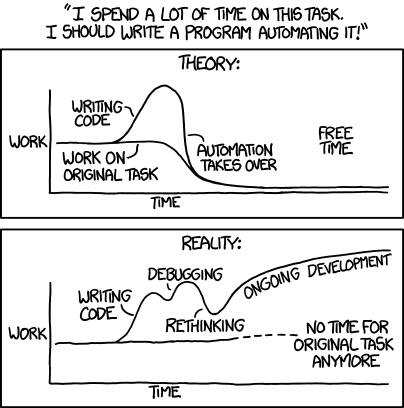
I don’t think I’ve ever linked to an XKCD comic on this blog before, but (of course) I read it regularly. This one made me chuckle, thinking about a project I’m currently working on. I have a task that involves generating output files and sending them to a few other companies via SFTP, weekly. For “phase one,” I was going to manually run my program to generate the files, then send them out with WinSCP. Then, once that was running smoothly, I was going to add SFTP capability to the program, using SSH.NET.
This is kind of a long story, but to make it short, let’s just say that I’ve spent more time than is really reasonable taking care of the SFTP automation, and have yet to put it into production. Meanwhile, I just keep sending out the files every week, manually.
I’ve actually learned a lot about a couple of things in the process of working on this automation, but the amount of effort that’s gone into the automation, vs. the five minutes it takes to send the files off manually once a week is a bit silly.